This is Part 3 of a three-part series on running a real camera fleet on Azure IoT Operations (AIO):
- Part 1: the control plane and network model - what the system is and how the cameras and networks work.
- Part 2: swapping in the Azure IoT Operations MQTT broker - TLS, X.509 camera identity, and topic authorization.
- Part 3 (this post): data flows, connectors, and the cloud - forwarding telemetry to Event Hubs and onboarding ONVIF cameras as AIO assets.
Part 2 put the fleet on the Azure IoT Operations MQTT broker. Now the broker is no longer just a message bus - it is an edge data plane, and two AIO features turn that into real leverage: data flows route telemetry to the cloud, and connectors bring in cameras that cannot speak our protocol at all. Both land without changing the control plane, which is the recurring theme of this series.
Forwarding Telemetry to the Cloud, for Free
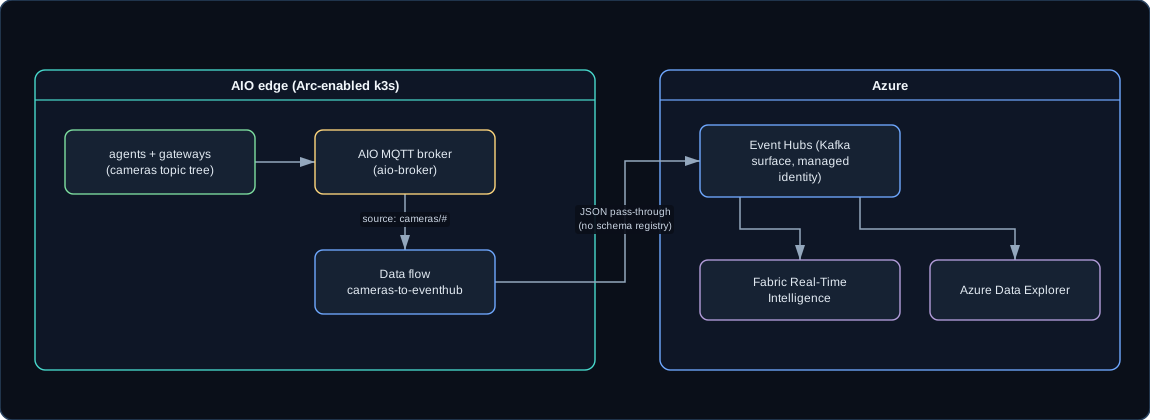
In Part 1, every producer publishes to one topic tree: cameras/<site>/<camera>/<channel>. That single fact makes cloud egress almost trivial. An AIO data flow has a source and a destination; point the source at the local broker on the cameras/# tree - the exact tree everything already uses - and point the destination at Azure.
The destination here is Azure Event Hubs, addressed through its Kafka surface, authenticated with the AIO instance’s managed identity (no connection strings on disk):
apiVersion: connectivity.iotoperations.azure.com/v1
kind: DataflowEndpoint
metadata:
  name: cameranetwork-eventhub
  namespace: azure-iot-operations
spec:
  endpointType: Kafka
  kafkaSettings:
    host: "<EVENTHUB_NAMESPACE>.servicebus.windows.net:9093"
    authentication:
      method: SystemAssignedManagedIdentity
      systemAssignedManagedIdentitySettings: {}
    tls:
      mode: Enabled
The data flow itself wires the local broker to that endpoint. The source endpointRef: default is AIO’s built-in local MQTT broker (aio-broker), and one side of every data flow must be that local broker:
apiVersion: connectivity.iotoperations.azure.com/v1
kind: Dataflow
metadata:
  name: cameras-to-eventhub
  namespace: azure-iot-operations
spec:
  profileRef: default
  mode: Enabled
  operations:
    - operationType: Source
      sourceSettings:
        endpointRef: default          # the local broker (host aio-broker)
        dataSources: [ "cameras/#" ]   # the same tree from Part 1
    - operationType: Destination
      destinationSettings:
        endpointRef: cameranetwork-eventhub
        dataDestination: camera-telemetry   # the Event Hub / Kafka topic name
Before applying it, you create the Event Hubs namespace and hub and grant the AIO managed identity the Azure Event Hubs Data Sender role - that role grant is what the managed-identity auth above relies on. Telemetry is forwarded as JSON pass-through, so no schema registry is needed here; the payloads landing in Event Hubs are the unchanged CameraNetwork.Contracts JSON from Part 1. The instance-level schema registry from Part 2 is still sitting there; it is a prerequisite of az iot ops create rather than of every data flow, and this flow simply does not reference a schema.
 (opens in a new tab)
As agents heartbeat, the Event Hubs “incoming messages” graph rises, carrying availability, inventory, status, and events for the whole fleet. From there, Fabric Real-Time Intelligence or Azure Data Explorer are the natural next stops for dashboards and historical analytics; those destinations add a schema-registry reference, but the edge side stays exactly as shown. The reason this is so cheap is structural. Part 1 single-sourced the topic tree, so cloud egress costs one data flow over cameras/# no matter how many producers publish into it.
Bringing In Cameras That Cannot Speak the Protocol
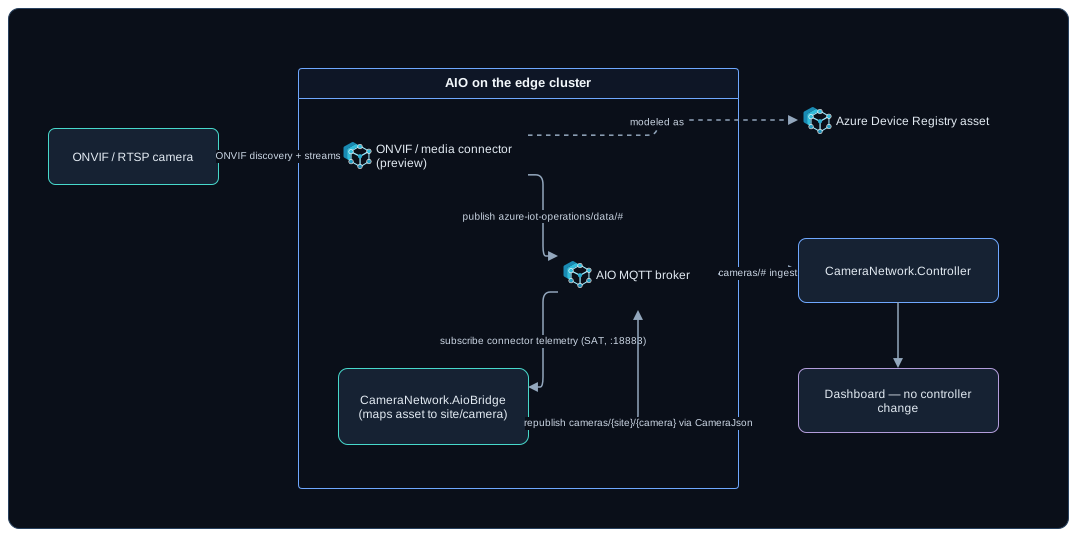
Data flows handle the outbound story. The inbound story is connectors. AIO ships an ONVIF connector and a media connector that can talk to standards-based cameras directly - discover them, model them as assets, and publish their telemetry into the broker. That is a different path from the Class A site gateway in Part 1, and it is interesting precisely because it lets AIO itself onboard a camera.
The connectors are preview (per the Microsoft Learn docs linked at the bottom of this post, as retrieved in June 2026) and their custom resources are version- and install-specific, so they are deployed through the supported tooling rather than checked-in YAML. The flow is:
- Register the camera as an Azure Device Registry device (its ONVIF endpoint plus credentials).
- Let discovery enumerate the camera’s capabilities and profiles.
- Create assets for the streams and snapshots you care about.
At that point the connector is publishing asset telemetry into the AIO broker - but on its topic and in its shape, not on the cameras/<site>/<camera>/... contract the controller understands. Something has to translate. That something is a small bridge.
The AioBridge: A Gateway Whose Probe Is a Connector
CameraNetwork.AioBridge is an in-cluster Worker service. Conceptually it is a site gateway whose probe is the AIO connector instead of a direct ONVIF query. It subscribes to the connector’s telemetry, maps each asset to a (site, camera) pair, and republishes onto cameras/<site>/<camera>/... using the same CameraJson serializer the rest of the fleet uses. To the controller, the result is indistinguishable from a Class A camera behind a gateway - which is the whole reason Part 1 insisted the controller never branch on camera class.
The bridge connects to AIO’s internal listener (aio-broker:18883, TLS plus a Kubernetes service-account token), so it never leaves the cluster. It gets its SAT through a projected volume and trusts the broker via the AIO CA bundle:
# 50-aiobridge-deployment.yaml (trimmed)
containers:
  - name: aio-bridge
    # image lives in a private registry; substitute your own build of the bridge
    image: <your-registry>/cameranetwork-aiobridge:0.1.0
    env:
      - name: AioBridge__Host
        value: "aio-broker"
      - name: AioBridge__Port
        value: "18883"
      - name: AioBridge__UseTls
        value: "true"
      - name: AioBridge__CaFile
        value: "/var/run/certs/ca.crt"
      - name: AioBridge__SatAuthFile
        value: "/var/run/secrets/tokens/broker-sat"
      - name: AioBridge__ConnectorTelemetryTopic
        value: "azure-iot-operations/data/#"
      - name: AioBridge__DefaultSiteId
        value: "aio-edge"
volumes:
  - name: broker-sat
    projected:
      sources:
        - serviceAccountToken:
            path: broker-sat
            audience: aio-internal
            expirationSeconds: 86400
That expirationSeconds: 86400 sits right at the Kubernetes default ceiling for projected service-account tokens. A cluster whose API server is configured with a lower maximum shortens it silently, and you meet that as a reconnect every few hours rather than as an error, so check the bound before you blame the broker.
Asset-to-camera identity is explicit so cameras do not collide: the preferred path is custom attributes on each asset (cameraNetwork.site and cameraNetwork.camera), with a fallback of a default site id plus a slug of the asset name. Connectors are preview, so the two things most likely to differ between installs - the connector’s telemetry topic and its payload field names - are isolated in one class, ConfigurableAssetTelemetryMapper, and covered by tests in the private reference implementation. Like the rest of the camera solution, the bridge itself is not published, so treat that class and its tests as design detail rather than downloadable code. If your connector publishes elsewhere or names fields differently, you adjust that single mapper, not the controller.
 (opens in a new tab)
Commands Back to Connector-Fronted Cameras
A camera that only reports is half a control plane. The bridge also answers commands, behind a toggle (AioBridge:HandleCommands, on by default). It subscribes to cameras/+/+/cmd and answers only for cameras it has actually seen. That wildcard does mean the broker hands the bridge every command on the tree, including ones addressed to Class B agents: MQTT delivers to every matching subscriber, so a subscription is never exclusive. The bridge keeps a set of the assets it has observed and drops anything outside it, which is what keeps two subscribers on the same topic from both answering.
Command handling sits behind an IBridgeCommandExecutor seam, mirroring the site gateway’s policy. The default executor acks get_status as succeeded and acks everything else - including snapshot - as unsupported, until you plug in a real executor backed by media-connector capture or ONVIF control. The ack comes back on cameras/<site>/<camera>/cmd_ack, the same channel from Part 1. In the dashboard, you click get-status on an AIO camera and watch the cmd_ack arrive, exactly as you would for an agent-managed camera.
This is the closed command set from Part 1 doing its job again: the bridge cannot be told to do anything arbitrary, only to attempt actions from the fixed vocabulary, and it honestly reports unsupported for the ones it cannot yet perform.
The Whole Picture
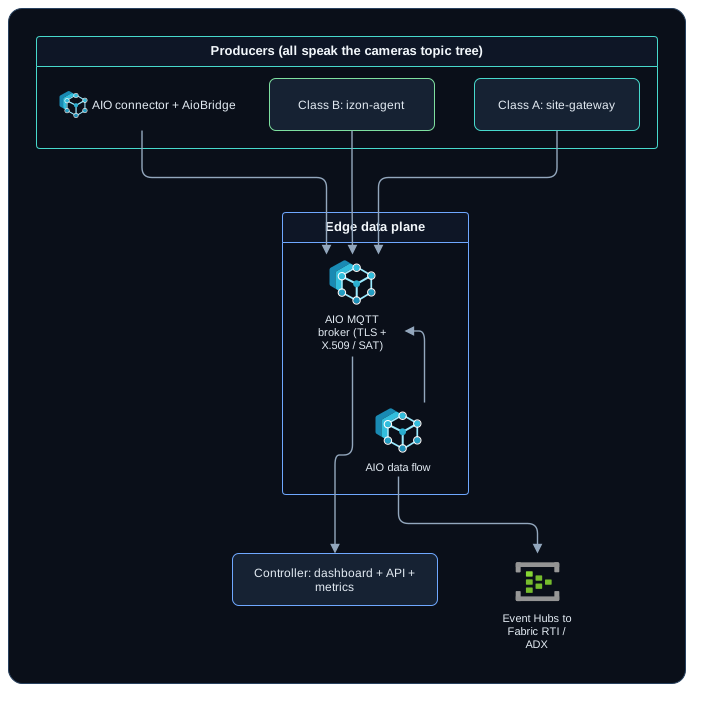
Put the three posts together and the shape is a single contract with interchangeable parts underneath it:
 (opens in a new tab)
Three kinds of cameras, one wire contract, one broker, one data flow to the cloud, and a controller that treats all of them identically. Azure IoT Operations went in underneath the contract as the broker in Part 2, and beside it as connectors and data flows in Part 3, and the contract itself never moved. That is the argument for AIO in a camera control plane: it is an enterprise-grade edge MQTT broker and cloud data plane that you can adopt incrementally, behind a seam, without rewriting the system that already works.
Start at Part 1 if you came in here first - the contract and the network model are what make all of this hold together.