This is Part 1 of a three-part series on running a real camera fleet on Azure IoT Operations (AIO):
- Part 1 (this post): the control plane and network model - what the system is, how the cameras work, and how the networks work.
- Part 2: swapping in the Azure IoT Operations MQTT broker - TLS, X.509 camera identity, and topic authorization on Arc-enabled Kubernetes.
- Part 3: data flows, connectors, and the cloud - forwarding telemetry to Event Hubs and onboarding ONVIF cameras as AIO assets.
I built a central camera control plane in .NET 10, then made Azure IoT Operations an opt-in broker and edge data plane for it. The interesting part of that story is that AIO does not replace the design - it slots into an existing, opinionated one. So before the AIO specifics in Parts 2 and 3, this post covers the foundation AIO plugs into: the control plane, the two camera integration classes, the MQTT wire contract, and the network model.
Why a Control Plane Beats a Pile of Cameras
The usual way people “network” cameras is to put a pile of cheap IP cameras on a LAN, port-forward an NVR, and hope. That model rots: every camera is a little server with a web UI, a Telnet port, and firmware from 2017, and every one is an inbound attack surface.
The control-plane model inverts that. A camera is treated like a managed IoT node:
- It connects outbound to an MQTT broker.
- It publishes its status, inventory, and events.
- It subscribes for commands from a central server.
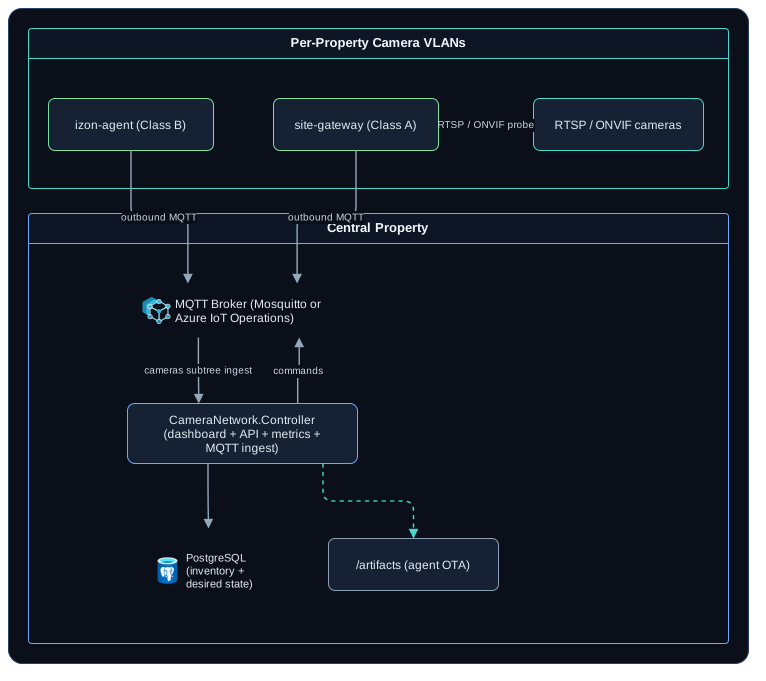
There is no inbound SSH or Telnet to a camera in normal operation. The central server owns identity, configuration, status, commands, updates, health, and stream registration. The camera (or a per-site gateway) owns capture, health checks, watchdog behavior, and safe command execution. What a camera exposes to the network, in the end, is a fixed set of messages.
 (opens in a new tab)
The .NET solution behind this is a standard clean-architecture layout (.NET 10 + Aspire): CameraNetwork.Contracts holds the wire types, CameraNetwork.Controller is the Blazor Server dashboard + REST API + /metrics, and two lightweight Worker services run at the edge - CameraNetwork.Agent and CameraNetwork.SiteGateway. Those two are how the fleet splits into two integration classes. The solution is part of my private reference implementation and is not published, so treat these project names as documentation of the design rather than pointers to a cloneable repo.
Two Kinds of Cameras, One Control Plane
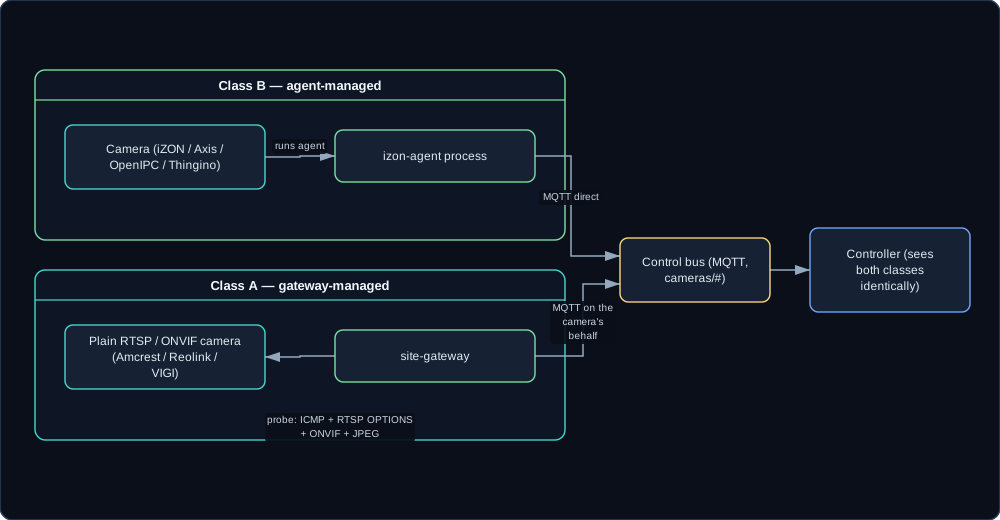
Real fleets are never homogeneous. Some cameras can run our code; most cannot. The design absorbs that with two classes that look identical to the control plane:
- Class B - agent-managed. The camera runs our sidecar, the izon-agent (
CameraNetwork.Agent), and speaks MQTT directly. This is for cameras you can get a process onto: iZON, Axis ACAP, OpenIPC, Thingino. The agent reports health, accepts the closed command set, watches the RTSP stream, and updates itself. - Class A - gateway-managed. A plain RTSP/ONVIF PoE camera (Amcrest, Reolink, TP-Link VIGI, and similar) that cannot run our code. A per-site
CameraNetwork.SiteGatewayspeaks for it: it probes the camera and publishes availability, inventory, and status on the camera’s behalf, so a “dumb” camera shows up in the dashboard like any other.
The Class A probe does real network work. It runs an ICMP reachability check, an RTSP OPTIONS handshake, an ONVIF query (make, model, firmware, MAC, stream and snapshot URLs, plus WS-Discovery), and a validated JPEG snapshot pull. That probing sits behind an ICameraProbe seam, with a NetworkCameraProbe for real cameras and a SimulatedCameraProbe for dev and CI.
 (opens in a new tab)
The payoff: the controller code, the dashboard, the API, and the metrics never branch on camera class. A Class A camera fronted by a gateway and a Class B camera running the agent produce the same records. That uniformity is exactly what lets Part 3 add a third producer - an Azure IoT Operations connector - without the controller noticing.
The Wire Contract: One MQTT Topic Tree
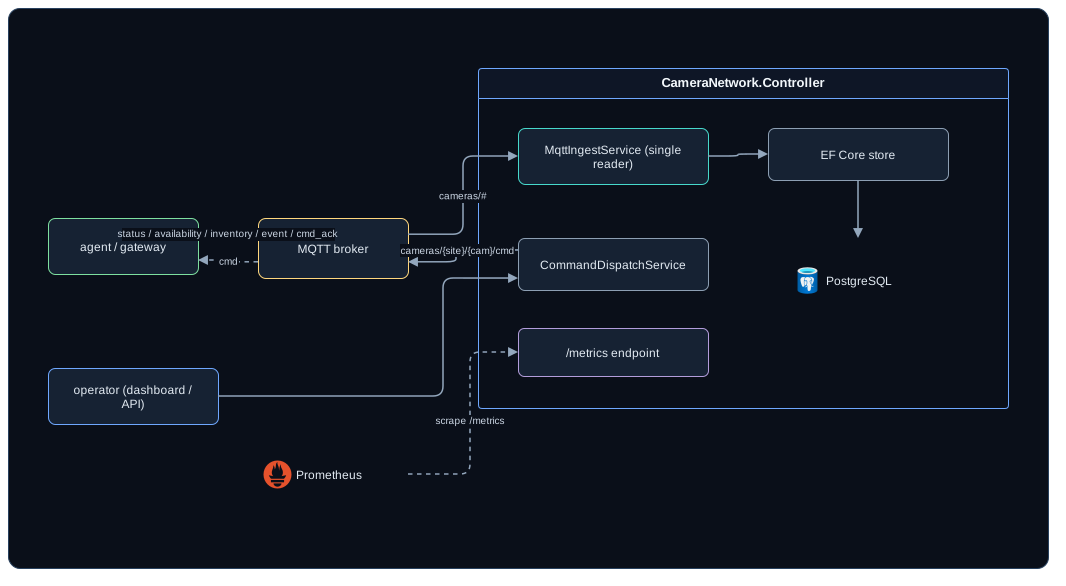
Everything rides on one topic tree, rooted at cameras and shaped cameras/<site>/<camera>/<channel>. The controller subscribes to cameras/#; an agent publishes its own channels and subscribes only to its own cmd topic. The contract lives in code in CameraNetwork.Contracts, so the controller and the agents cannot drift apart.
Each row below is the <channel> at the end of that tree:
| Channel | Direction | Notes |
|---|---|---|
availability |
agent to controller | retained, mirrors the Last-Will |
inventory |
agent to controller | retained |
status |
agent to controller | heartbeat (the reported state) |
event |
agent to controller | motion, tamper, RTSP loss, etc. |
metrics |
agent to controller | optional |
cmd |
controller to agent | the only topic the agent subscribes to |
cmd_ack |
agent to controller | command result |
log |
agent to controller | on demand |
Two design choices matter here. First, availability is retained and backed by an MQTT Last-Will: the agent sets a retained Last-Will of {"state":"offline"} on connect, so an unexpected drop flips the camera offline with no active reporting. Second, the command set is closed. An agent rejects anything outside this list, so the channel can never become arbitrary remote code execution across the fleet:
restart_rtsp   restart_network   reboot       identify
privacy_on     privacy_off       snapshot     get_status
get_logs       apply_config      update_agent rollback_agent
Acks come back as accepted (non-terminal), succeeded, failed, or unsupported. The closed set is the security model for the command channel - it is the reason a compromised broker session cannot tell a camera to do something arbitrary.
The controller reasons in terms of desired state versus reported state. An operator sets a desired agent version and config; the controller hashes the config into a stable 16-character DesiredConfigHash. Pushing apply_config carries that config and hash to the agent, which applies it and echoes the hash back in its status as ReportedConfigHash. Config drift is then just DesiredConfigHash != ReportedConfigHash, and an outdated agent is DesiredAgentVersion != ReportedAgentVersion. Both surface on the dashboard and in /metrics.
 (opens in a new tab)
This contract is the seam that makes the rest of the series possible. Because it is single-sourced and broker-agnostic, the broker underneath it can change without touching either end - which is exactly what Part 2 does.
The Network Model
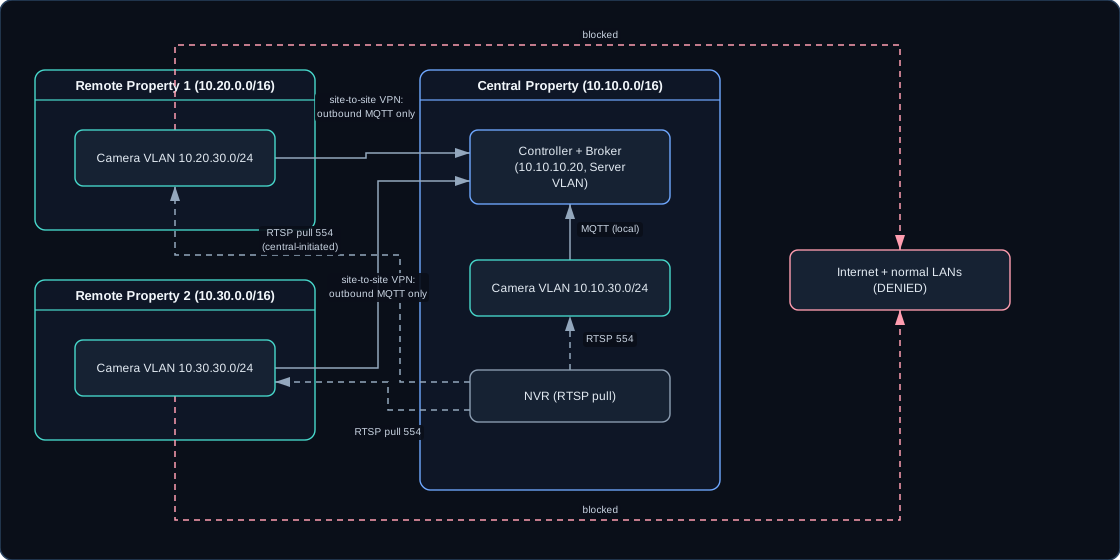
The control plane assumes unique routed subnets per property over a site-to-site routed VPN (WireGuard, or IPsec on pfSense), not client NAT. You do not overlap 192.168.1.0/24 everywhere; each property gets its own space and the central peer holds routes to each remote camera subnet.
Central property
  LAN            10.10.0.0/16
  Server VLAN    10.10.10.0/24
  Camera VLAN    10.10.30.0/24

Remote property 1
  LAN            10.20.0.0/16
  Camera VLAN    10.20.30.0/24

Remote property 2
  LAN            10.30.0.0/16
  Camera VLAN    10.30.30.0/24

VPN transit      10.255.0.0/24

camera-control.internal    10.10.10.20
mqtt.camera.internal       10.10.10.20
The camera VLANs are default-deny. Treat every old camera as compromised until proven otherwise, and only allow what is required:
| Source | Destination and port | Purpose |
|---|---|---|
| Camera VLANs | controller, TCP 1883 or 8883 | MQTT control/status |
| Camera VLANs | controller, TCP 443 | config/update API |
| Camera VLANs | DNS resolver, TCP/UDP 53 | name resolution |
| Camera VLANs | NTP resolver, UDP 123 | time sync |
| Camera VLANs | Internet, deny | no cloud callbacks |
| Camera VLANs | normal LANs, deny | camera isolation |
| NVR | Camera VLANs, TCP 554 | RTSP pull (central-only) |
DNS is only skippable if every agent is pinned to an IP address. The moment a config says mqtt.camera.internal instead of 10.10.10.20, that row is load-bearing.
The important property falls out of this directly: control commands never require inbound SSH or Telnet to a camera. The agent (or gateway) holds an outbound MQTT connection, and the controller publishes commands the camera receives over that already-open connection. Cameras get no Internet, no camera-to-camera traffic, and no path to the normal LAN. Vendor cloud domains stay blocked; old web and Telnet services stay firewalled.
 (opens in a new tab)
Procurement note. For client-, business-, or government-adjacent work, avoid Hikvision and Dahua (FCC Covered List) and prefer Axis, Hanwha, Bosch, i-PRO, Amcrest, Reolink, or UniFi. TP-Link VIGI is in my own fleet and is not on the Covered List, but TP-Link has been under active US supply-chain review, which makes it a poor choice to write into that kind of bid.
Where Azure IoT Operations Comes In
Notice what the broker actually is in all of this: a trusted MQTT bus on a private routed VPN. The default deployment uses Eclipse Mosquitto, hardened with per-camera username/password and ACLs, and reachable only from the camera VLANs and the controller - never from the Internet or the normal LANs. That works, and the rest of the series leaves it as the byte-identical default.
But the broker is also a seam. The agents, the gateway, and the controller all connect through one shared set of connection options, and the topics and JSON payloads are defined once in CameraNetwork.Contracts. That means the broker can be swapped for something with a richer edge story without changing a single line of camera or controller logic - and Azure IoT Operations is exactly that something:
- AIO ships an enterprise-grade MQTT broker that runs on Arc-enabled Kubernetes at the edge. Part 2 swaps Mosquitto for it, with TLS and per-camera X.509 identity, and replaces the Mosquitto ACL file with attribute-based authorization rules.
- AIO ships data flows that route from that broker to the cloud. Part 3 forwards the same
cameras/#tree to Azure Event Hubs with no application change, then onboards ONVIF cameras as AIO assets through a connector and a small bridge.
The key idea, and the reason this is worth three posts: AIO is introduced as an opt-in parallel path. The control plane, the two camera classes, the wire contract, and the network model in this post all stay exactly as described. AIO changes what sits under the contract and what happens after the message reaches the broker - not the contract itself.
Continue to Part 2: swapping in the Azure IoT Operations MQTT broker.