This is Part 2 of a three-part series on running a real camera fleet on Azure IoT Operations (AIO):
- Part 1: the control plane and network model - what the system is and how the cameras and networks work.
- Part 2 (this post): swapping in the Azure IoT Operations MQTT broker - TLS, X.509 camera identity, and topic authorization.
- Part 3: data flows, connectors, and the cloud - forwarding telemetry to Event Hubs and onboarding ONVIF cameras as AIO assets.
In Part 1 the broker was just “a trusted MQTT bus” - Eclipse Mosquitto by default. This post replaces it with the Azure IoT Operations MQTT broker without touching a single line of camera or controller logic, and gets stronger security for free in the process. The whole point of AIO here is that it gives you an enterprise MQTT broker that runs on Kubernetes at the edge, with cloud-managed identity, authorization, and (in Part 3) data flows - while the application keeps speaking the exact same topics and payloads.
The Seam That Makes the Swap Possible
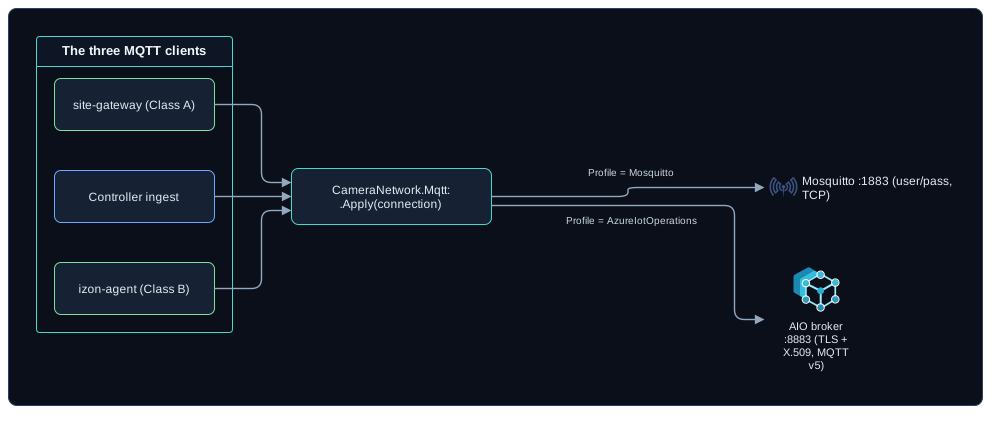
The control plane has three MQTT clients: the controller’s ingest service, the Class B agent, and the Class A site gateway. All three connect through one shared project, CameraNetwork.Mqtt, which exposes a MqttConnectionOptions record and a single extension method:
// Every client builds its options the same way:
var options = new MqttClientOptionsBuilder()
    .WithClientId(clientId)
    .Apply(connection)   // profile -> TLS / MQTT v5 / auth
    .Build();
MqttConnectionOptions carries a profile, an auth mode, and the TLS and credential details. There are two profiles:
Mosquitto(the default) - plain TCP on 1883, username/password, MQTT 3.1.1. Nothing in Part 1 changes.AzureIotOperations- turns on TLS and MQTT v5 automatically, withAuth=X509for clients outside the cluster orAuth=Sat(Kubernetes service-account token) for in-cluster components.
Because the profile resolves the transport details, swapping brokers happens in configuration. The MQTT library already speaks v5, TLS, and X.509 client certificates, so there is no new client dependency to put a fleet on AIO.
 (opens in a new tab)
Standing Up Azure IoT Operations
AIO runs on an Azure Arc-enabled Kubernetes cluster. For a sandbox that is a single-node k3s box; in production it is whatever Arc-enabled cluster you run at the edge. The bring-up is a sequence of az commands (wrapped in a setup script in the private repo behind this series, not published here), and it is deliberately a parallel sandbox - it never touches the existing Docker Compose or TrueNAS deployment, which keep using Mosquitto.
The command shapes below match the AIO CLI as of June 2026. The schema-registry prerequisite in particular is version-sensitive, so re-check the deployment doc if az iot ops create rejects any arguments. That registry is an instance-level requirement; the camera data flow in Part 3 never references a schema, which is why Part 3 can say no schema registry is needed and mean something different.
# Arc-connect the cluster and enable the features AIO needs
az connectedk8s connect \
  --name cameranetwork-k3s --resource-group cameranetwork-aio \
  --location eastus
az connectedk8s enable-features \
  --name cameranetwork-k3s --resource-group cameranetwork-aio \
  --custom-locations-oid "$CL_OID" \
  --features cluster-connect custom-locations

# A storage account + schema registry are required before 'az iot ops create'
az iot ops schema registry create \
  --name cameranetwork-sr --resource-group cameranetwork-aio \
  --registry-namespace cameranetwork-sr-ns --sa-resource-id "$SA_ID"

# Initialize and create the AIO instance (broker, dataflows, and the rest)
az iot ops init \
  --cluster cameranetwork-k3s --resource-group cameranetwork-aio
az iot ops create \
  --cluster cameranetwork-k3s --resource-group cameranetwork-aio \
  --name cameranetwork-aio --sr-resource-id "$SR_ID"
When this finishes you have an AIO instance with an MQTT broker. AIO installs a default in-cluster listener (aio-broker:18883, TLS + service-account-token auth) for its own components. We leave that one alone and add a second listener for the cameras, which live outside the cluster.
A Listener for Cameras Outside the Cluster
Cameras connect from remote properties over the VPN, so they need a listener exposed off the cluster. On k3s, a LoadBalancer service picks up the node IP out of the box. The listener terminates TLS and references the X.509 authentication and authorization policies we define next.
apiVersion: mqttbroker.iotoperations.azure.com/v1
kind: BrokerListener
metadata:
  name: camera-external
  namespace: azure-iot-operations
spec:
  brokerRef: default
  serviceType: LoadBalancer
  # do not clash with the default 'aio-broker' service
  serviceName: aio-broker-external
  ports:
    - port: 8883
      protocol: Mqtt
      authenticationRef: camera-x509-authn
      authorizationRef: camera-authz
      tls:
        mode: Automatic
        certManagerCertificateSpec:
          issuerRef:
            # the issuer AIO installs by default
            name: azure-iot-operations-aio-certificate-issuer
            kind: ClusterIssuer
            group: cert-manager.io
tls.mode: Automatic lets cert-manager mint the listener’s server certificate from AIO’s default cluster issuer. That detail decides what your clients have to trust: the server certificate chains to AIO’s own CA, and not to the camera CA. Cameras validate the broker against the AIO CA trust bundle (the azure-iot-operations-aio-ca-trust-bundle ConfigMap in the azure-iot-operations namespace), and the camera CA below is only for the other direction - the client certificates the broker checks. Two CAs, two directions, and mixing them up produces a TLS failure that looks like a broker problem. To tighten further, add the external IP or DNS name as a SAN so clients can pin the hostname as well as the chain.
Per-Camera Identity With X.509
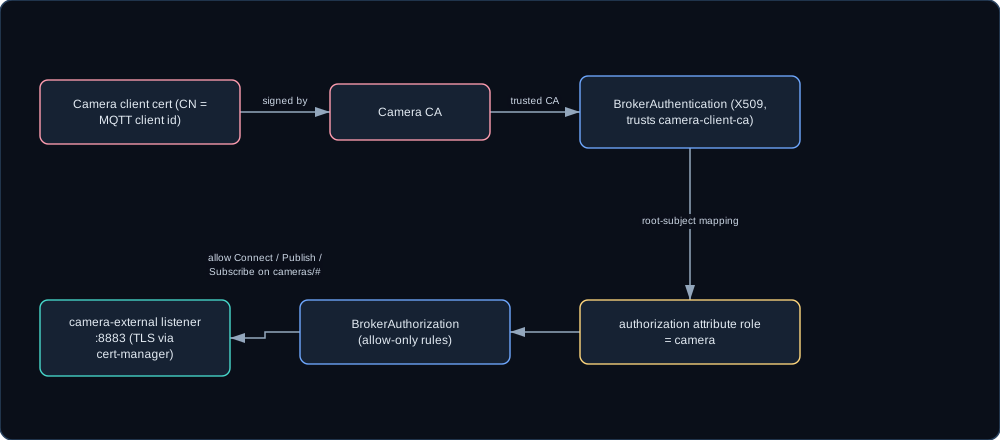
This is where AIO earns its keep over plain Mosquitto. Each camera presents a client certificate, and the broker validates it against a CA we control. The repo’s cert helper generates a CA and a per-camera client cert whose common name equals the MQTT client id:
./make-camera-cert.sh izon-remote1-garage-east     # Class B agent
./make-camera-cert.sh site-gateway-remote2         # Class A gateway
The CA certificate is imported into the cluster as a ConfigMap, and a BrokerAuthentication resource trusts it. The clever bit is the root-subject mapping: every certificate signed by our CA inherits the attribute role: camera, so the entire fleet shares one identity policy with no per-device wiring.
apiVersion: mqttbroker.iotoperations.azure.com/v1
kind: BrokerAuthentication
metadata:
  name: camera-x509-authn
  namespace: azure-iot-operations
spec:
  authenticationMethods:
    - method: X509
      x509Settings:
        trustedClientCaCert: camera-client-ca
        authorizationAttributes:
          cameras:
            # must match the CA subject exactly
            subject: CN = CameraNetwork Camera CA
            attributes:
              role: camera
One Rule for the Whole Fleet
With every camera certificate carrying role: camera, authorization is a single allow rule. AIO authorization policies are allow-only - anything not granted is denied - so this one rule lets the whole fleet connect and use the cameras/# topic tree, which is exactly the wire contract from Part 1.
apiVersion: mqttbroker.iotoperations.azure.com/v1
kind: BrokerAuthorization
metadata:
  name: camera-authz
  namespace: azure-iot-operations
spec:
  authorizationPolicies:
    cache: Enabled
    rules:
      - principals:
          attributes:
            - role: camera
        brokerResources:
          - method: Connect
          - method: Publish
            topics: [ "cameras/#" ]
          - method: Subscribe
            topics: [ "cameras/#" ]
On Mosquitto you hand every camera a username/password and an ACL file entry; here you hand every camera a certificate from one CA and write one attribute-based rule. The trust anchor moves from a shared secret to a certificate authority, which is a real upgrade: revoking a camera is a CRL or re-issue operation instead of a password edit pushed out to config files.
Be honest about what the single rule gives up, though. It grants the whole fleet the whole cameras/# tree, so any camera’s certificate can publish to any other camera’s topics - including another camera’s cmd. The per-camera Mosquitto ACL did not allow that, so what you have here is a simplification of it. On a sandbox where every certificate is one you minted an hour ago, it is a reasonable trade for a single YAML file.
 (opens in a new tab)
Anywhere past a sandbox, scope the rule per camera. Give each certificate site and camera attributes in the authentication resource, then substitute those attributes into the authorization topics: cameras/{principal.attributes.site}/{principal.attributes.camera}/+. That restores the per-camera isolation Part 1 relies on and keeps the one-rule shape. Start with the fleet-wide version if you want to see traffic flow on day one; do not leave it running.
Pointing a Component at AIO
You flip the profile and point at the external listener. A Class B agent’s settings:
{
  "Agent": {
    "SiteId": "remote1",
    "CameraId": "garage-east",
    "MqttProfile": "AzureIotOperations",
    "MqttHost": "<EXTERNAL-IP>",
    "MqttPort": 8883,
    "MqttAuth": "X509",
    "MqttClientCertPfxPath": "/certs/izon-remote1-garage-east.pfx",
    "MqttCaCertPath": "/certs/aio-ca.crt"
  }
}
The controller is the same idea with its own config prefix (environment variables shown):
Mqtt__Profile=AzureIotOperations
Mqtt__Host=<EXTERNAL-IP>
Mqtt__Port=8883
Mqtt__Auth=X509
Mqtt__ClientCertPfxPath=/certs/camera-controller.pfx
Mqtt__CaCertPath=/certs/aio-ca.crt
MqttProfile=AzureIotOperations turns on TLS and MQTT v5 automatically. The CA path is the AIO trust bundle, exported from the cluster as shown below; the camera CA never appears in these files, because it only signs the client certificate the broker checks. There is also a MqttAllowUntrustedCertificates flag that skips server-cert validation outright. It exists for the case where the listener’s certificate has no SAN for the address you are dialing, it is a sandbox-only escape hatch, and the fix is to add the SAN rather than to ship the flag. The controller can also run inside the cluster with Auth=Sat and Host=aio-broker, using the default internal listener.
Verify the Fleet Landed on the Broker
Check the broker resources, then watch a real camera connect over TLS with its client certificate:
# Broker resources are healthy
kubectl get brokerlistener,brokerauthentication,brokerauthorization \
  -n azure-iot-operations
az iot ops check

# Export the AIO CA the listener's server cert chains to
# (confirm the ConfigMap key on your install)
kubectl get configmap azure-iot-operations-aio-ca-trust-bundle \
  -n azure-iot-operations \
  -o jsonpath='{.data.ca\.crt}' > certs/aio-ca.crt

# Subscribe with that CA for the server and a camera cert/key for the client
mosquitto_sub -h <EXTERNAL-IP> -p 8883 -V mqttv5 -t 'cameras/#' -v \
  --cafile certs/aio-ca.crt \
  --cert certs/izon-remote1-garage-east.crt \
  --key certs/izon-remote1-garage-east.key
Start the agent with the AIO config and you see its retained availability and inventory, then periodic status. Point the controller at the same listener and the camera appears on the dashboard exactly as it did on Mosquitto. Kill the agent and its availability flips to offline through the Last-Will - the retained-message and Last-Will-Testament behavior carries across brokers, which is the real test that the swap is transparent.
Why This Matters
The Mosquitto deployment trusts the private VPN and VLAN: the broker is never exposed to untrusted networks, hardening is per-camera username/password plus ACLs, and the firewall makes port 1883 reachable only from the camera VLANs and the controller. That is a perfectly good model on a trusted segment.
Moving to the AIO broker upgrades the trust model without changing the application:
- Identity is a certificate from a CA you control, not a shared secret.
- TLS is on by the profile, so cameras can cross less-trusted segments.
- Authorization is attribute-based and cloud-managed, and token substitution scopes it per camera without adding a rule per device.
- The broker is now a managed Kubernetes workload with health you can query (
az iot ops check), not a single container.
And critically, the message contract from Part 1 is untouched. That is what sets up Part 3: once the fleet is publishing to the AIO broker, AIO can route that traffic to the cloud and onboard new kinds of cameras as assets - again with no application change.
Continue to Part 3: data flows, connectors, and the cloud.