Back in 2019 a vendor shut down the cloud behind my cameras and bricked them; I repurposed what was left instead of throwing the hardware out, and the fleet never left. So when this series needed a real workload instead of a generic AI sample, the camera fleet was the obvious pick. Availability, RTSP loss, stale heartbeats, motion bursts, command acknowledgements, config drift, and connector-fronted cameras all flow through the existing cameras/# contract already.
The goal is not asking a model to read random logs. The goal is turning structured edge events into operator guidance without changing the camera control plane. Those are two very different projects, and I only signed up for one of them.
What an Operator Actually Needs
Edge operators do not need another dashboard full of raw events. I have stared at enough of those to know they mostly teach you where to look next. What an operator wants when a site goes quiet is simple: what happened, what is impacted, what evidence supports that conclusion, and what action should happen first.
The camera control plane already has the right shape for this:
- Cameras or gateways connect outbound.
- They publish status, inventory, availability, events, metrics, command acknowledgements, and logs.
- The topic tree is consistent:
cameras/<site>/<camera>/<channel>. - Azure IoT Operations can sit under that topic contract as the MQTT broker and edge data plane.
- A data flow can forward the same
cameras/#stream northbound without changing producers.
So the operations assistant builds on that contract. It does not create a second camera model. One camera model in this house is plenty.
Three Ways In, One Event Shape
 (opens in a new tab)
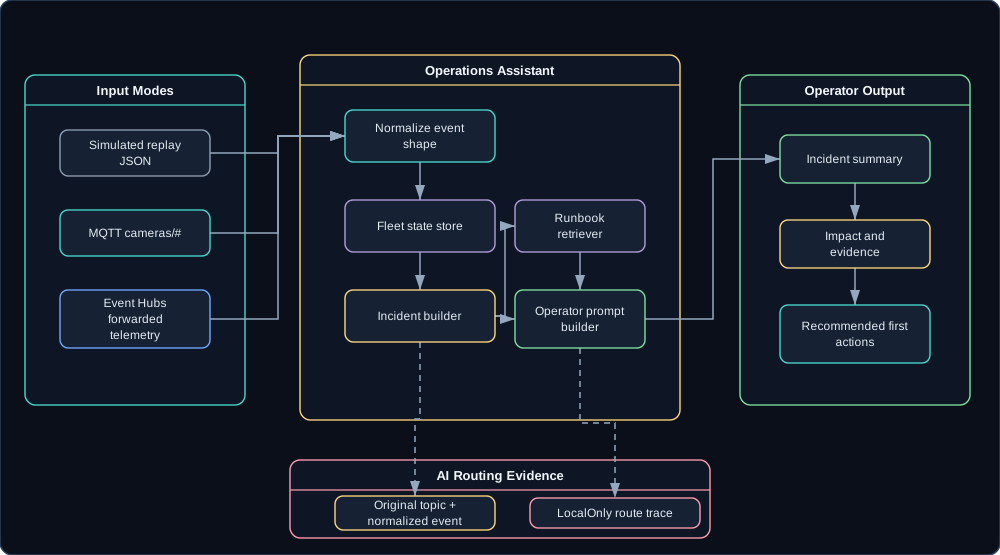
In the design, AiOnTheEdge.OperationsAssistant takes input three ways. Simulated mode replays JSON from samples/camera-events, which is the reliable presentation path. MQTT mode subscribes to cameras/#, which is the local edge path. Event Hubs mode consumes forwarded camera telemetry, which is the cloud analytics path.
Every input mode normalizes events into one shape. The sample below is synthetic, and so is the fleet around it: garage-east is the Class B agent camera the camera series describes on remote1, while driveway-west and front-door are invented siblings on the same site so the incident grouping has something to group.
{
  "eventId": "evt-001",
  "timestampUtc": "2026-06-30T12:00:00Z",
  "siteId": "remote1",
  "cameraId": "garage-east",
  "channel": "event",
  "eventType": "rtsp_loss",
  "severity": "warning",
  "payload": {
    "streamUrl": "rtsp://camera/stream1",
    "durationSeconds": 90,
    "lastFrameUtc": "2026-06-30T11:58:30Z"
  }
}
From there the service builds incidents from facts. Six pieces split the work:
CameraEventIngestWorkerreads replay files, MQTT, or Event Hubs.FleetStateStoretracks latest status, inventory, availability, version, config hash, and recent events.IncidentBuildergroups related events by site, camera, event type, time window, and severity.RunbookRetrieverpulls relevant local runbook chunks from the Knowledge Assistant.OperatorPromptBuildercreates a compact prompt from structured facts and runbook snippets.OperationsAssistantControllerexposes incident summaries and fleet questions.
And whatever the assistant answers, evidence rides along with it:
{
  "summary": "Remote property 1 likely has a site-level network issue.",
  "impact": [
    "garage-east offline",
    "driveway-west offline",
    "front-door heartbeat stale"
  ],
  "evidence": [
    {
      "timestampUtc": "2026-06-30T11:58:30Z",
      "cameraId": "garage-east",
      "eventType": "rtsp_loss"
    }
  ],
  "recommendedActions": [
    "Check the remote1 camera VLAN gateway and VPN tunnel.",
    "Verify NTP and DNS availability for the camera VLAN.",
    "Avoid rebooting individual cameras until site connectivity is confirmed."
  ],
  "routeDecision": {
    "policy": "LocalOnly",
    "selectedBackend": "foundry-local"
  }
}
How the Talk Actually Runs
The moment worth staging takes a raw event through incident grouping to a first action. Here is the run order I actually use:
- Start replay:
site-network-partition. - Show raw events arriving, each one displayed under the
cameras/<site>/<camera>/<channel>topic composed from its site, camera, and channel. - Show normalized events updating fleet state.
- Ask:
What happened at remote1 in the last 15 minutes? - Show the assistant summary, impacted cameras, evidence, runbook citations, and first actions.
- Open the route trace and show local-only inference due to operational camera telemetry.
- Trigger
config-drift. - Ask:
Which cameras need config remediation? - Show desired versus reported config hash and the
apply_configrecommendation. - Show that the same raw events can also flow through Azure IoT Operations and Event Hubs in the full Azure path.
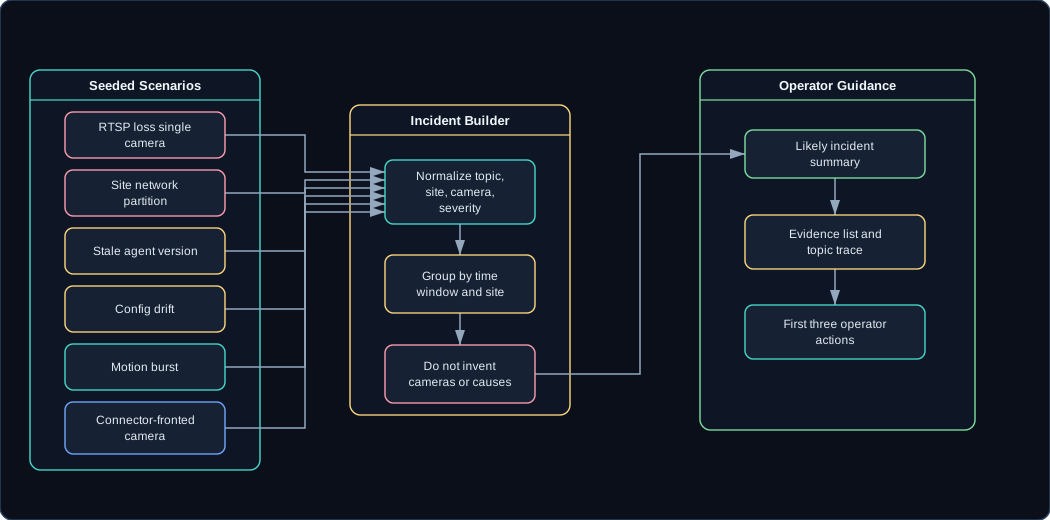
Notice what the model never does: invent cameras, sites, or causes. It summarizes only from structured incident facts and retrieved runbook text. If the facts do not name a cause, neither does the assistant.
Standing on the Camera Series
The three camera posts already define the control plane, and this demo does not reopen it:
- Part 1 defines the topic tree, network model, command set, desired/reported state, and camera classes.
- Part 2 swaps the broker under the same contract to Azure IoT Operations.
- Part 3 forwards
cameras/#to Event Hubs and adds the ONVIF connector bridge path.
Those posts are prerequisites here; this one adds a local AI operations layer on top and stops arguing about cameras. The new build is just the operations surface:
POST /camera-events
GET  /fleet/sites
GET  /fleet/sites/{siteId}
GET  /fleet/cameras/{siteId}/{cameraId}
GET  /incidents
GET  /incidents/{incidentId}
POST /incidents/{incidentId}/summarize
POST /fleet/query
POST /admin/demo/replay/{scenarioName}
 (opens in a new tab)
The diagram above traces one scenario the whole way to operator guidance. The table below is the cast list - six seeded scenarios that give the demo its plot:
| Scenario | Events |
|---|---|
rtsp-loss-single-camera |
One camera reachable but RTSP failing. |
site-network-partition |
Multiple cameras offline at one site within 90 seconds. |
stale-agent-version |
Camera healthy but agent version behind desired version. |
config-drift |
Desired config hash differs from reported config hash. |
motion-burst |
Many motion events across cameras at one site. |
connector-fronted-camera |
AIO connector event mapped back into the camera contract. |
Each scenario lives in AiOnTheEdge.DemoScenarios as a deterministic script of normalized events, so the demo behaves the same way in a hotel ballroom as it did on my desk. For example, the shape of the site-network-partition scenario file is:
{
  "scenarioName": "site-network-partition",
  "description": "Cameras at one site drop inside a 90-second window.",
  "events": [
    {
      "offsetSeconds": 0,
      "event": {
        "eventId": "evt-partition-001",
        "siteId": "remote1",
        "cameraId": "garage-east",
        "channel": "event",
        "eventType": "rtsp_loss",
        "severity": "warning"
      }
    },
    {
      "offsetSeconds": 45,
      "event": {
        "eventId": "evt-partition-002",
        "siteId": "remote1",
        "cameraId": "driveway-west",
        "channel": "availability",
        "eventType": "offline",
        "severity": "error"
      }
    }
  ]
}
The Hallucination Trap
A confident hallucinated incident is the outcome this whole design is built to avoid. An assistant that infers a site outage because it sounds plausible is worse than no assistant at all; somebody will act on that answer and start rebooting the wrong things. It should only name a cause when the structured facts and runbook snippets support it.
For a live demo, the simulator is the default. Real cameras and Azure IoT Operations are valuable, but the presentation should not depend on a camera or a VPN behaving perfectly. Talks provide enough surprises on their own.
What Demo 3 Has to Prove
Replay has to produce the same fleet state every time, because a demo that drifts is a demo that argues with me on stage. On top of that determinism, the assistant has to summarize several seeded incident types and cite structured evidence and runbook snippets for each one, and the screen has to show the whole chain at once: original topic, normalized event, grouped incident, and the answer built from them. The hard constraint sits at the end of that chain - the answer never names a camera or a site that is not already in the event store.
The other two input modes are there to prove the shape generalizes. MQTT mode subscribes to cameras/# when a broker is present, Event Hubs mode consumes forwarded telemetry when Azure is connected, and neither one changes a line of the assistant’s logic. All of it runs without a real camera in the room. If the demo needed real cameras, I would be doing IT support on stage instead of showing an architecture.
Related Posts
This is the direct continuation of the Azure IoT Operations camera series. The existing control-plane post owns the cameras/# contract; this post uses that contract as the AI workload.