This series builds the AI on the Edge demo system: cloud-governed, locally executed AI using a .NET gateway, policy-driven model routing, private RAG, camera fleet telemetry, Azure Arc operations, and accelerator-backed endpoints.
Jared Rhodes, · July 13, 2026–September 7, 2026, · 9 posts
https://jaredrhodes.com
AI on the Edge: Local AI Without Local Chaos
July 13, 2026
Years ago a vendor shut down the cloud service behind my home security cameras and left me holding hardware I owned but could no longer use. I salvaged what I could and kept the lesson: anything I actually depend on should run where I can reach it. That instinct is most of why local AI appeals to me - privacy, latency, cost control, disconnected operation, and the simple fact that some data already lives at the edge. The hard part was never getting one model to answer one prompt on one box. The hard part is making local AI behave like a platform instead of a pile of model servers hiding under desks.
That is the point of AI on the Edge. The project is a governable edge AI system where applications call one API, policy decides where inference is allowed to run, Azure provides the management plane, and the local environment keeps working when the network is not perfect.
The tagline is not decoration. It is the operating model:
Cloud-governed, locally executed.
Why Local AI Goes Sideways
Model sprawl never announces itself. A developer points an app at a local runtime. An operations team deploys a different endpoint on a Kubernetes node. A hardware experiment bolts on an accelerator-specific API. A cloud team wants a managed endpoint for approved workloads. Every one of those decisions is reasonable on its own. Stacked together, they become an unmanaged surface:
Applications hardcode model endpoints.
Sensitive prompts can fall back to cloud by accident.
Local model failures are invisible to operations teams.
Hardware-specific demos turn into one-off branches.
Edge environments have no consistent reset, smoke test, or dashboard story.
AI on the Edge treats those as platform problems. The model runtime matters, but the project is really about routing, policy, observability, secrets, fallback, repeatability, and deployment.
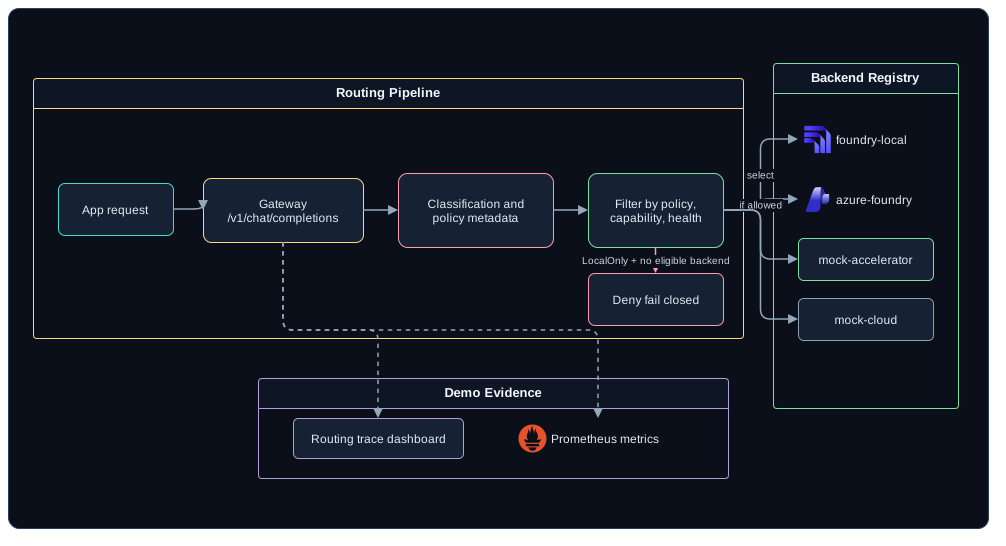
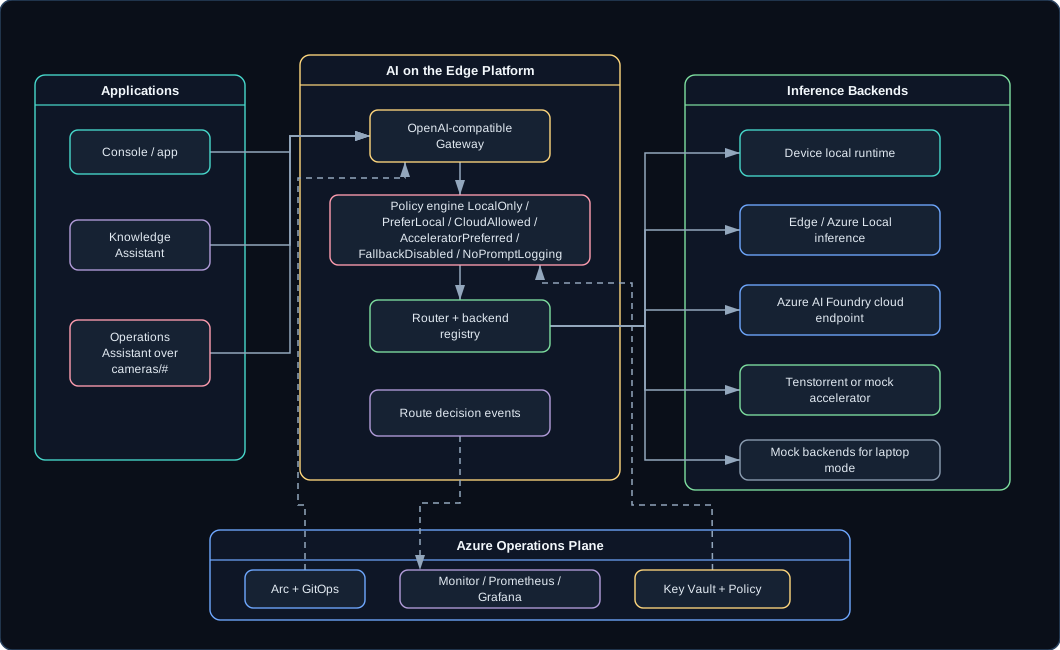
The center of the system is a reusable .NET gateway that exposes an OpenAI-compatible API to the application. Behind that gateway sit a backend registry and a policy-driven router. Depending on the request, inference can land on a laptop-local runtime, an Azure Local deployment, an Azure AI Foundry model endpoint, a Tenstorrent-backed endpoint, or a deterministic mock backend that exists purely for conference safety.
The important part is that the application never picks the backend directly. It sends the request with metadata, and that metadata is the contract: the workload (chat, embeddings, RAG answer, incident summary), the classification (public, internal, restricted, secret), the policy (local only, prefer local, cloud allowed, accelerator preferred), and the operational context (latency target, streaming requirement, fallback rules).
For every request, the gateway emits a route decision event. That event records the selected backend, the denied backends, the policy, the classification, the fallback behavior, latency, token counts, and whether prompt bodies were logged, redacted, or suppressed. When somebody asks why an answer came from where it did, the answer lives in the telemetry, not in my memory.
Azure provides the control plane wrapped around that local execution:
Azure Arc brings the edge Kubernetes cluster into Azure management.
GitOps applies the desired state.
Azure Monitor, Managed Prometheus, and Grafana make behavior visible.
Key Vault handles secrets and certificates where the Azure-governed path is active.
Azure Policy and application policy events make denied routes explicit.
Azure IoT Operations gives the camera workload a real edge data plane.
How the Demos Stack Up
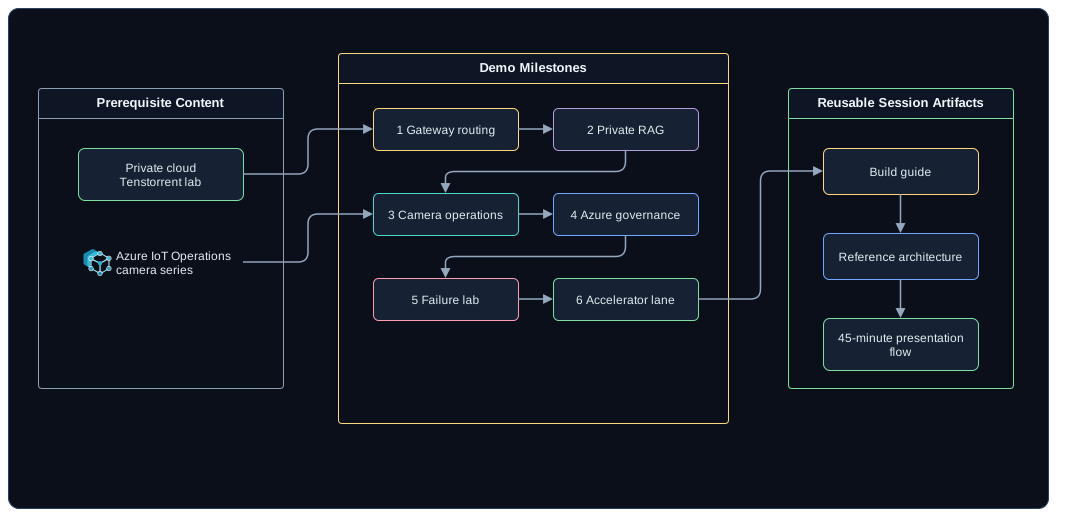
The series maps straight onto how I am building the talk:
One prompt routes to different backends without app changes.
Demo 2: Private RAG That Cannot Leave the Edge
Private RAG
Restricted data fails closed instead of falling back to cloud.
Demo 3: From Camera Events to Operator Guidance
Camera operations
Raw camera events become an incident summary and first actions.
Demo 4: Edge AI You Can Actually Operate
Azure governance
Routing, failures, and policy decisions show up in Azure-backed dashboards.
Demo 5: When the Edge Has to Stand Alone
Failure lab
Backend failures and cloud blocks produce visible, correct behavior.
Demo 6: Specialized Hardware Without an App Rewrite
Accelerator lane
Tenstorrent or mock accelerator is just another governed backend.
The final two posts turn the demo system into an implementation guide and an evergreen reference architecture.
Standing on Work I Already Published
The private cloud and physical lab are already covered in Home Lab - Tenstorrent Buildout for Multi-Cloud Edge Demos. That post owns the hardware story: basement studio, private cloud, Tenstorrent paths, NVIDIA systems, Proxmox, TrueNAS, Kubernetes, and multi-cloud demo intent.
The camera control plane is already covered in the three-part Azure IoT Operations series. Those posts own the camera details: outbound MQTT, the cameras/<site>/<camera>/<channel> topic tree, TLS and X.509 on the AIO MQTT broker, data flows to Event Hubs, and the ONVIF connector bridge.
AI on the Edge builds on both instead of repeating either. The lab is the environment, the cameras are the workload, and the new thing is the AI platform that sits between them.
What I Am Actually Building Here
The demo system is the new work:
AiOnTheEdge.Gateway for the OpenAI-compatible facade.
AiOnTheEdge.Routing for backend selection, fallback, and policy.
AiOnTheEdge.KnowledgeAssistant for private RAG over local documents.
AiOnTheEdge.OperationsAssistant for camera event triage.
AiOnTheEdge.ControlDashboard for health, route traces, privacy posture, and failure controls.
AiOnTheEdge.Telemetry for route decision events, metrics, and log export.
AiOnTheEdge.DemoScenarios for deterministic seed, reset, replay, and smoke tests.
Azure and Kubernetes deployment assets for the governed edge path.
One status note, stated here once so the whole series inherits it: these components are part of my private reference implementation for the talk. The build is in progress and the repo is not published, so the posts that follow present API surfaces, registries, and acceptance criteria as the design the demos target - not as downloadable software. Nobody will be cloning their way into this series, and pretending otherwise would just waste your afternoon.
The first version has to run in laptop mode on mock or local backends. Azure-governed mode is the richer path, and I am deliberately keeping it off the critical path for a live session.
Quiet Policy Drift
Quiet policy drift is the failure mode this whole project is arranged against. A local backend goes down, a cloud endpoint happens to be healthy, and a restricted prompt leaves the edge because retry is the only trick the application knows.
So restricted data fails closed here. Cloud fallback happens because a policy allowed it, and the audience gets to watch the denial, the reason, and the telemetry rather than take my word for any of it.
What the Series Has to Earn
By the last post, a few claims have to hold up on stage rather than on paper. One application should reach several kinds of backend through one gateway with no code change, and restricted content should stay on the edge even when a healthy cloud endpoint is sitting right there waiting to answer. Camera telemetry should drive an operator assistant on top of the MQTT contract the camera series already published, without renegotiating that contract to make the AI work.
The operations half matters just as much. Azure has to be able to see routing, failures, policy denials, and backend health from outside the cluster, because a system nobody can observe is a system nobody can run. And all of it has to come up in laptop mode with no cloud dependency, then reset, seed, and smoke-test itself before a session starts, since a conference network is the one piece of infrastructure I never get to choose.
One application asks one question and gets one useful answer. Where the model actually ran - the laptop, an edge cluster, a cloud endpoint, a Tenstorrent-backed server, or a mock backend - is none of the application’s business. Keeping that placement choice invisible to the app is the entire job of the AI on the Edge Gateway, and this first demo exists to make that abstraction obvious end to end.
Why Hardcoded Endpoints Stop Scaling
Hardcoding model endpoints is fine for a prototype and bad for a platform. Once an application knows too much about the model runtime, every placement decision turns into an app change:
Moving from a laptop runtime to an edge server changes code.
Adding a cloud fallback changes code.
Testing a specialized accelerator changes code.
Denying cloud fallback for restricted data becomes app-specific retry logic.
The app should express what it needs. The platform should decide where that request is allowed to run.
On the outside, the API surface is deliberately boring - it is the surface applications already speak:
POST /v1/chat/completions
POST /v1/embeddings
GET  /v1/models
GET  /healthz
GET  /readyz
GET  /metrics
POST /admin/route/explain
POST /admin/backends/{backendId}/enable
POST /admin/backends/{backendId}/disable
POST /admin/demo/faults
Routing those endpoints is a backend registry. Two entries carry the argument:
The two cloud entries follow the same shape and are omitted for length. azure-foundry is an Azure AI Foundry endpoint at priority 50 with an apiKeySecretName instead of an open port; mock-cloud is a deterministic stand-in on http://localhost:5188/v1 at priority 40. Both are tagged "location": "cloud", both advertise the chat family, and both serve a model called cloud-chat.
Two fields there keep applications out of the model-naming business. families is what an application asks for - chat or embeddings - and models is what this particular backend calls the thing that serves that family. The app requests a family, the router picks an eligible backend, and the router maps the family onto that backend’s model name. Nobody writing an app needs to know that local-chat and cloud-chat are the same request with different hosting.
priority breaks ties among the backends that survive policy, capability, and health filtering, and lower wins. foundry-local at 10 is tried before mock-accelerator at 20, which is tried before the cloud entries at 40 and 50.
One caveat on that baseUrl: 5273 is the port Microsoft’s examples show, but the Foundry Local service port is assigned dynamically, so anything real discovers it through foundry service status or the SDK manager rather than pinning it in a registry file.
Every backend gets normalized into the same internal shape: health, advertised families and their model names, capabilities, location, tags, priority, observed latency, and current fault state. From there on, the router does not care whether a backend is a laptop runtime or a rack in the basement.
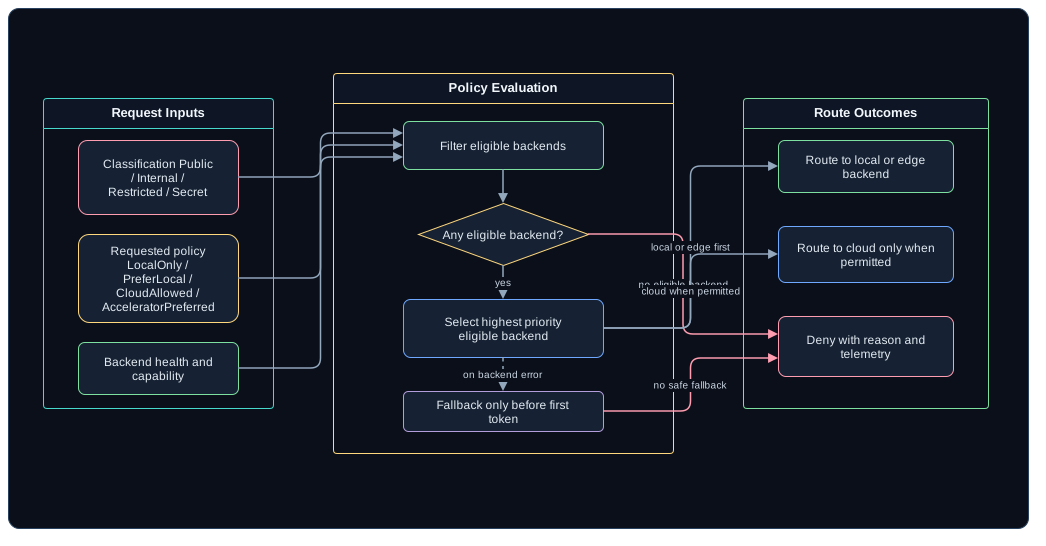
Then comes the rule I kept coming back to: the router evaluates policy before it evaluates convenience.
The policies are small enough to keep in your head:
The six policies a request can be sent under
Policy
Behavior
LocalOnly
Only device or edge backends are eligible. Cloud fallback is denied.
PreferLocal
Prefer local, then Azure Local or edge, then cloud if allowed.
CloudAllowed
Any healthy backend is eligible.
AcceleratorPreferred
Prefer a backend tagged accelerator when the model family is supported.
FallbackDisabled
Fail closed if the selected backend is unavailable.
NoPromptLogging
Emit metadata only and suppress prompt and response bodies.
Foundry Local belongs in this first demo as the device-local runtime. Microsoft positions it as an on-device AI runtime and SDK, with an optional local server aimed at development and integration scenarios - which is a different job from being the shared multi-user server inference layer for the whole edge estate. For server-style edge inference, the demo keeps Azure Local, other OpenAI-compatible services, and accelerator endpoints behind the same registry.
Walking Through the Demo
Route explanation carries this demo. This is the sequence I rehearse until it gets boring:
Open the Control Dashboard.
Ask: Summarize the current edge site health and recommend the next action.
Show the response streaming through the gateway.
Open the route trace and show selectedBackend: foundry-local.
Disable foundry-local.
Ask again with CloudAllowed and show the fallback to azure-foundry or mock-cloud.
Disable mock-accelerator too, so nothing local or edge-located is left eligible.
Ask again with LocalOnly.
Show the denial and its reason, where a quiet cloud trip would otherwise have happened.
Re-enable both local backends and show the metrics panel.
The line I want the audience walking out with is simple: same app, same API, different placement decision.
Borrowing the Lab Instead of Rebuilding It
The private cloud lab already supplies the edge environment and the Tenstorrent hardware lane, and the camera series already supplies an operational workload. Neither one needs rebuilding just to prove a gateway. Demo 1 can run entirely with a local runtime and deterministic mock backends.
The new implementation is the gateway foundation:
OpenAI-compatible request and response normalization.
Backend registry and health checks.
Route explanation endpoint.
Policy evaluation before fallback.
Prometheus metrics.
Route decision events.
Admin controls for enable, disable, and fault injection.
A dashboard panel for backend health, latency, selected backend, and denial reasons.
Before any of this depends on real cloud or real hardware, the implementation should include a mock local backend, the mock-cloud backend from the registry above, and a mock accelerator. Deterministic mocks are what make a conference demo survive a conference network.
When the Local Box Dies
The first failure worth showing is local backend loss:
The failures the gateway has to survive correctly
Situation
Correct behavior
Local backend down, policy CloudAllowed
Route to an allowed cloud or mock-cloud backend.
Local backend down, LocalOnly, no other eligible edge backend
Record adapter error and fallback only before streaming begins.
And the rule underneath every row of that table: the gateway must never treat “cloud is healthy” as permission to send restricted content there.
Calling Demo 1 Done
Demo 1 earns its number when one application can call /v1/chat/completions and reach device, edge, and cloud backends through the same request shape, and the Control Dashboard can say which backend answered, under which policy, with which fallback reason and latency. Disabling a backend has to change the routing decision live, and LocalOnly has to stop cloud fallback rather than merely delay it. The metrics carry request count, latency, selected backend, fallback count, and denied count, because the dashboard is a summary and the metrics are the evidence behind it.
The criterion I care most about is the dullest one. make demo-laptop brings the whole thing up with no cloud dependency at all, which is the difference between a demo and a hope. As the opening post said, this is a private build in progress, so that target is the bar the work is aimed at rather than something you can run today.
Related Posts
This post is the platform foundation for the private RAG demo, the camera operations assistant, the failure lab, and the accelerator lane that follow. The existing Tenstorrent buildout is the hardware background; the existing camera control-plane post is the workload background. Neither is required reading, but both are why this post stayed short.
Private data is the easiest reason to care about edge AI. If the data cannot leave the site, then the answer cannot depend on a cloud fallback that nobody noticed.
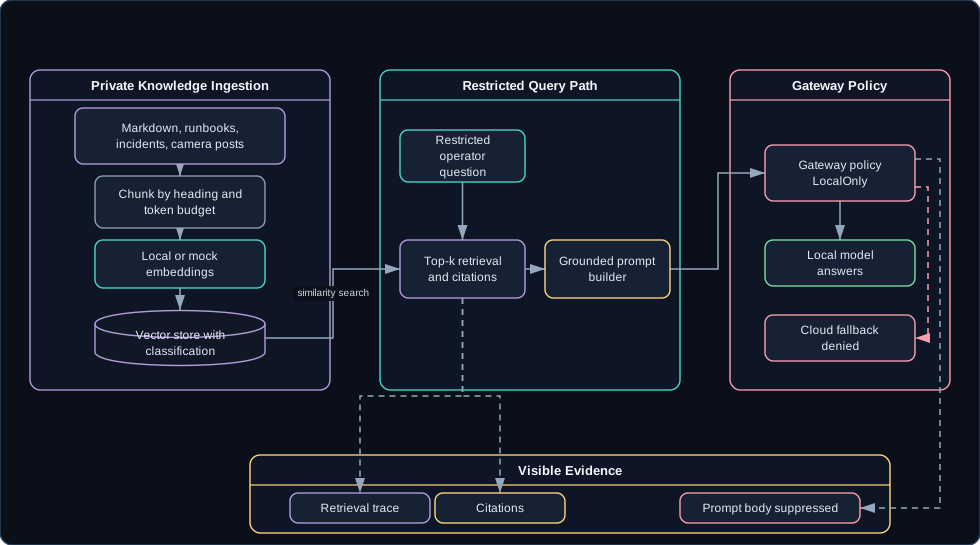
Demo 2 extends the platform with a Knowledge Assistant. In the design, it ingests local documents, builds embeddings locally when available, retrieves relevant chunks, generates grounded answers, and sends every generation request through the same routing policy engine from Demo 1. The RAG part is nearly conventional. The part I actually care about is that the privacy promise gets enforced by routing instead of by hope.
Where Most RAG Demos Leak
RAG demos tend to blur the privacy boundary in the same comfortable way: the documents are local, but answer generation quietly calls a cloud model. For public docs, nobody gets hurt. For camera runbooks, incident notes, network diagrams, customer data, or site-specific operational history, that silent hop is the whole ballgame.
So the privacy promise has to be testable:
What classification was assigned to the document?
Which chunks were retrieved?
Was the prompt body logged?
Which backend generated the answer?
What would happen if the local backend failed?
Each of those answers has to be visible in the demo itself, or the demo is proving nothing.
Ingest documents with metadata and classification.
Chunk and embed the documents.
Retrieve relevant context for a question.
Ask the gateway for an answer under an explicit policy.
The first version should keep storage boring: one local vector store, wrapped behind an interface, with the retrieval trace visible. The citations come from retrieval metadata, not from model-generated prose - if the model is writing its own bibliography, the citations are fiction with good formatting.
A seeded document looks like this:
{"documentId":"garage-camera-runbook","title":"Garage Camera Runbook, Remote Property 1","sourcePath":"samples/documents/garage-camera-runbook.md","classification":"Restricted","tags":["iot","cameras","runbook"],"createdUtc":"2026-05-11T09:00:00Z"}
One honesty note before anyone asks for the dataset: the documents, queries, and responses in this post are synthetic samples rather than captured traffic. Site ids follow the camera series naming - remote1 and remote2 are the remote properties in the Part 1 network model, and garage-east is the Class B agent camera configured on remote1 in Part 2.
The query shape makes policy explicit:
{"question":"What should I check first if the remote1 garage camera is offline?","classification":"Restricted","policy":"LocalOnly","topK":5,"includeCitations":true}
The response carries everything those five testability questions need: the answer, citations, route decision, privacy decision, and retrieval trace:
{"answer":"Check the remote1 site network path before rebooting cameras...","citations":[{"documentId":"garage-camera-runbook","heading":"Offline camera checklist","score":0.86}],"routeDecision":{"policy":"LocalOnly","selectedBackend":"foundry-local","fallbackUsed":false},"privacyDecision":{"promptBodyLogged":false,"reason":"Restricted content suppresses prompt body logging."}}
Foundry Local is a good fit for the laptop version because Microsoft documents local embedding generation and RAG-style workflows that run on device. The implementation still supports mock embeddings, because the demo has to run even before every model is cached.
Running the Denial on Purpose
What the audience watches for is a denied fallback.
Show the document library: runbooks, deployment notes, and incident notes classified Restricted, plus the published architecture posts sitting alongside them as background.
Ask: Which cameras are offline, what probably caused it, and what should the operator check first?
Show retrieved chunks and citation metadata, all of them from the restricted set.
Show the grounded answer.
Open the route trace: classification Restricted, policy LocalOnly, selected local backend.
Disable foundry-local and mock-accelerator, so no device or edge backend is left eligible.
Ask again.
Show the request fail closed, because the only healthy backends left are cloud.
Change the classification to Internal.
Ask again with a policy that allows fallback.
Show cloud or mock-cloud fallback arriving only after the policy changed.
That last step carries the demo. The privacy boundary moved because somebody changed a policy on stage, which is the only way it is ever supposed to move.
Seed Documents I Already Own
The existing posts pull double duty as seed documents:
The Tenstorrent private cloud buildout gives hardware and environment context.
The Azure IoT Operations camera posts give camera topology, MQTT topics, broker security, data-flow routing, and connector notes.
Those posts get ingested as samples, but this demo does not retell them. It proves that private operational knowledge can be queried locally with citations.
The new build is AiOnTheEdge.KnowledgeAssistant:
POST /documents/ingest
GET  /documents
POST /query
POST /query/explain
POST /admin/reindex
Those are additions. Underneath them the service exposes the same operational endpoints every service in the system exposes - /healthz, /readyz, /metrics, /admin/demo/reset, /admin/demo/seed, and /admin/demo/faults - so seeding the corpus goes through the shared /admin/demo/seed, and /admin/reindex is the only genuinely RAG-specific control.
Implementation requirements:
Ingest Markdown, PDF text, JSON, CSV, and plain text.
Chunk by heading, paragraph, and token budget.
Preserve source filename, heading path, and classification.
Use Foundry Local embeddings where available.
Support local or mock embeddings for fallback.
Generate citations from retrieval metadata.
Send answer generation through the AI on the Edge Gateway.
Evaluate known questions with expected citations.
The Outage That Proves the Boundary
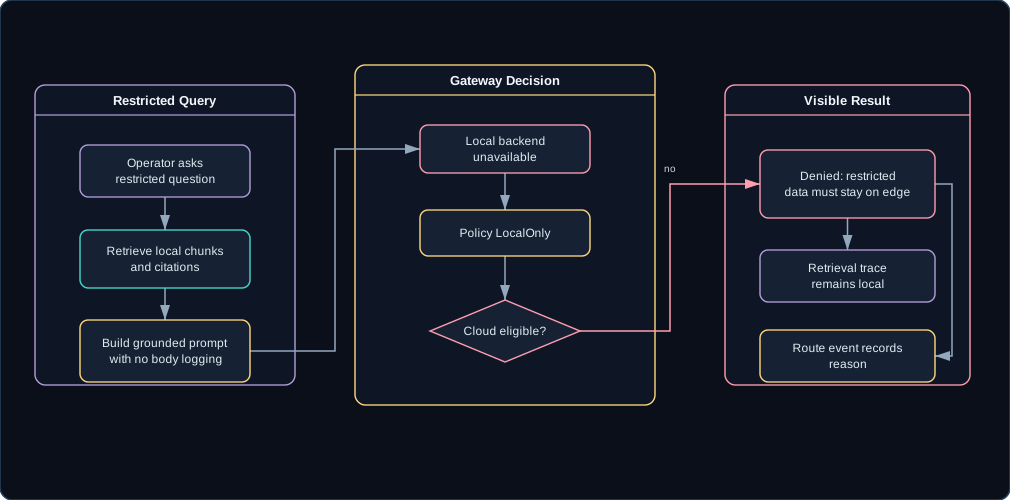
Everything above assumes the local model answers. The case worth rehearsing is the one where it does not and the data is still restricted.
Cloud fallback is not a recovery path for restricted RAG. The system returns a clear denial instead:
{"decision":"Denied","policy":"LocalOnly","reason":"Restricted content stays on edge; no eligible edge backend."}
The UI shows the retrieval trace and the route denial side by side, which makes the behavior legible: the system found useful context and correctly refused to send it to an ineligible backend.
The Bar for Demo 2
The demo works when sample documents ingest with their metadata and classification intact, queries come back grounded with citations that point at real chunks, and restricted content only ever reaches a device or edge backend. The denial has to be visible rather than inferred: LocalOnly with nothing local left standing produces a refusal on screen, with the retrieval trace beside it showing the context it declined to send anywhere.
Two supporting pieces make the claim checkable rather than theatrical. An evaluation pass runs ten known questions against expected citations and produces pass or fail, which is the only way I can tell whether a chunking change made retrieval worse. And once the models and packages are cached, the whole thing runs with the network unplugged, which is the shortest possible proof that nothing was quietly reaching out.
Related Posts
This demo ingests the existing camera and lab posts as background context around a restricted corpus, and it depends on the gateway from One App, Many Places to Run AI, because the RAG assistant should not own fallback policy itself. The moment a component owns fallback policy, it starts making exceptions.
Back in 2019 a vendor shut down the cloud behind my cameras and bricked them; I repurposed what was left instead of throwing the hardware out, and the fleet never left. So when this series needed a real workload instead of a generic AI sample, the camera fleet was the obvious pick. Availability, RTSP loss, stale heartbeats, motion bursts, command acknowledgements, config drift, and connector-fronted cameras all flow through the existing cameras/# contract already.
The goal is not asking a model to read random logs. The goal is turning structured edge events into operator guidance without changing the camera control plane. Those are two very different projects, and I only signed up for one of them.
What an Operator Actually Needs
Edge operators do not need another dashboard full of raw events. I have stared at enough of those to know they mostly teach you where to look next. What an operator wants when a site goes quiet is simple: what happened, what is impacted, what evidence supports that conclusion, and what action should happen first.
The camera control plane already has the right shape for this:
Cameras or gateways connect outbound.
They publish status, inventory, availability, events, metrics, command acknowledgements, and logs.
The topic tree is consistent: cameras/<site>/<camera>/<channel>.
Azure IoT Operations can sit under that topic contract as the MQTT broker and edge data plane.
A data flow can forward the same cameras/# stream northbound without changing producers.
So the operations assistant builds on that contract. It does not create a second camera model. One camera model in this house is plenty.
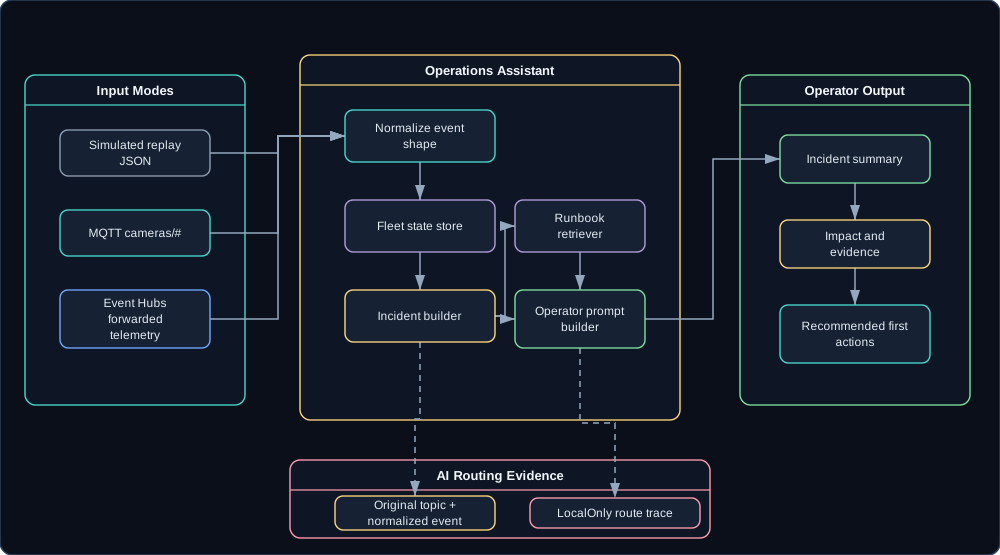
In the design, AiOnTheEdge.OperationsAssistant takes input three ways. Simulated mode replays JSON from samples/camera-events, which is the reliable presentation path. MQTT mode subscribes to cameras/#, which is the local edge path. Event Hubs mode consumes forwarded camera telemetry, which is the cloud analytics path.
Every input mode normalizes events into one shape. The sample below is synthetic, and so is the fleet around it: garage-east is the Class B agent camera the camera series describes on remote1, while driveway-west and front-door are invented siblings on the same site so the incident grouping has something to group.
IncidentBuilder groups related events by site, camera, event type, time window, and severity.
RunbookRetriever pulls relevant local runbook chunks from the Knowledge Assistant.
OperatorPromptBuilder creates a compact prompt from structured facts and runbook snippets.
OperationsAssistantController exposes incident summaries and fleet questions.
And whatever the assistant answers, evidence rides along with it:
{"summary":"Remote property 1 likely has a site-level network issue.","impact":["garage-east offline","driveway-west offline","front-door heartbeat stale"],"evidence":[{"timestampUtc":"2026-06-30T11:58:30Z","cameraId":"garage-east","eventType":"rtsp_loss"}],"recommendedActions":["Check the remote1 camera VLAN gateway and VPN tunnel.","Verify NTP and DNS availability for the camera VLAN.","Avoid rebooting individual cameras until site connectivity is confirmed."],"routeDecision":{"policy":"LocalOnly","selectedBackend":"foundry-local"}}
How the Talk Actually Runs
The moment worth staging takes a raw event through incident grouping to a first action. Here is the run order I actually use:
Start replay: site-network-partition.
Show raw events arriving, each one displayed under the cameras/<site>/<camera>/<channel> topic composed from its site, camera, and channel.
Show normalized events updating fleet state.
Ask: What happened at remote1 in the last 15 minutes?
Show the assistant summary, impacted cameras, evidence, runbook citations, and first actions.
Open the route trace and show local-only inference due to operational camera telemetry.
Trigger config-drift.
Ask: Which cameras need config remediation?
Show desired versus reported config hash and the apply_config recommendation.
Show that the same raw events can also flow through Azure IoT Operations and Event Hubs in the full Azure path.
Notice what the model never does: invent cameras, sites, or causes. It summarizes only from structured incident facts and retrieved runbook text. If the facts do not name a cause, neither does the assistant.
Standing on the Camera Series
The three camera posts already define the control plane, and this demo does not reopen it:
Part 1 defines the topic tree, network model, command set, desired/reported state, and camera classes.
Part 2 swaps the broker under the same contract to Azure IoT Operations.
Part 3 forwards cameras/# to Event Hubs and adds the ONVIF connector bridge path.
Those posts are prerequisites here; this one adds a local AI operations layer on top and stops arguing about cameras. The new build is just the operations surface:
POST /camera-events
GET  /fleet/sites
GET  /fleet/sites/{siteId}
GET  /fleet/cameras/{siteId}/{cameraId}
GET  /incidents
GET  /incidents/{incidentId}
POST /incidents/{incidentId}/summarize
POST /fleet/query
POST /admin/demo/replay/{scenarioName}
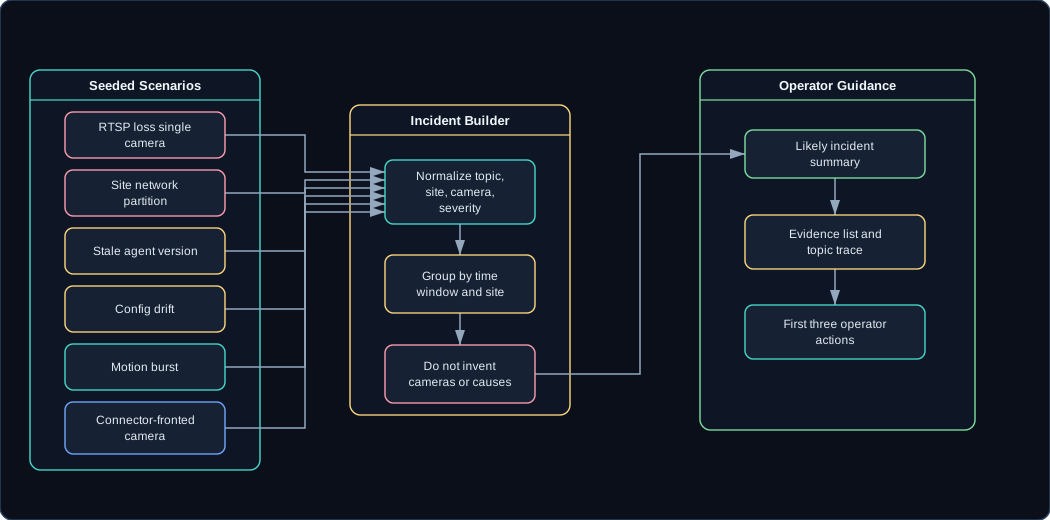
The diagram above traces one scenario the whole way to operator guidance. The table below is the cast list - six seeded scenarios that give the demo its plot:
Six seeded incidents, each defined by its event pattern
Scenario
Events
rtsp-loss-single-camera
One camera reachable but RTSP failing.
site-network-partition
Multiple cameras offline at one site within 90 seconds.
stale-agent-version
Camera healthy but agent version behind desired version.
config-drift
Desired config hash differs from reported config hash.
motion-burst
Many motion events across cameras at one site.
connector-fronted-camera
AIO connector event mapped back into the camera contract.
Each scenario lives in AiOnTheEdge.DemoScenarios as a deterministic script of normalized events, so the demo behaves the same way in a hotel ballroom as it did on my desk. For example, the shape of the site-network-partition scenario file is:
{"scenarioName":"site-network-partition","description":"Cameras at one site drop inside a 90-second window.","events":[{"offsetSeconds":0,"event":{"eventId":"evt-partition-001","siteId":"remote1","cameraId":"garage-east","channel":"event","eventType":"rtsp_loss","severity":"warning"}},{"offsetSeconds":45,"event":{"eventId":"evt-partition-002","siteId":"remote1","cameraId":"driveway-west","channel":"availability","eventType":"offline","severity":"error"}}]}
The Hallucination Trap
A confident hallucinated incident is the outcome this whole design is built to avoid. An assistant that infers a site outage because it sounds plausible is worse than no assistant at all; somebody will act on that answer and start rebooting the wrong things. It should only name a cause when the structured facts and runbook snippets support it.
For a live demo, the simulator is the default. Real cameras and Azure IoT Operations are valuable, but the presentation should not depend on a camera or a VPN behaving perfectly. Talks provide enough surprises on their own.
What Demo 3 Has to Prove
Replay has to produce the same fleet state every time, because a demo that drifts is a demo that argues with me on stage. On top of that determinism, the assistant has to summarize several seeded incident types and cite structured evidence and runbook snippets for each one, and the screen has to show the whole chain at once: original topic, normalized event, grouped incident, and the answer built from them. The hard constraint sits at the end of that chain - the answer never names a camera or a site that is not already in the event store.
The other two input modes are there to prove the shape generalizes. MQTT mode subscribes to cameras/# when a broker is present, Event Hubs mode consumes forwarded telemetry when Azure is connected, and neither one changes a line of the assistant’s logic. All of it runs without a real camera in the room. If the demo needed real cameras, I would be doing IT support on stage instead of showing an architecture.
Related Posts
This is the direct continuation of the Azure IoT Operations camera series. The existing control-plane post owns the cameras/# contract; this post uses that contract as the AI workload.
Answering prompts is not the same as operating a system, a distinction I did not fully appreciate until the demos started stacking up. Teams also have to deploy it, secure it, observe it, rotate its secrets, understand its failures, and prove policy decisions after the fact. That is what Demo 4 sets up with Azure. The model may run locally, but the estate should still be visible and governable.
Local AI Goes Invisible
Local AI can become invisible infrastructure, and it happens without anyone deciding anything. A model server starts on a developer machine. A Kubernetes deployment gets copied to an edge node. A gateway ends up with API keys in a config file. Logs stay local. Metrics are whatever the process prints. Nobody can tell which requests went where. I have watched perfectly serious systems drift into exactly that state one shortcut at a time, and invisibility is not an operating model an enterprise can run on.
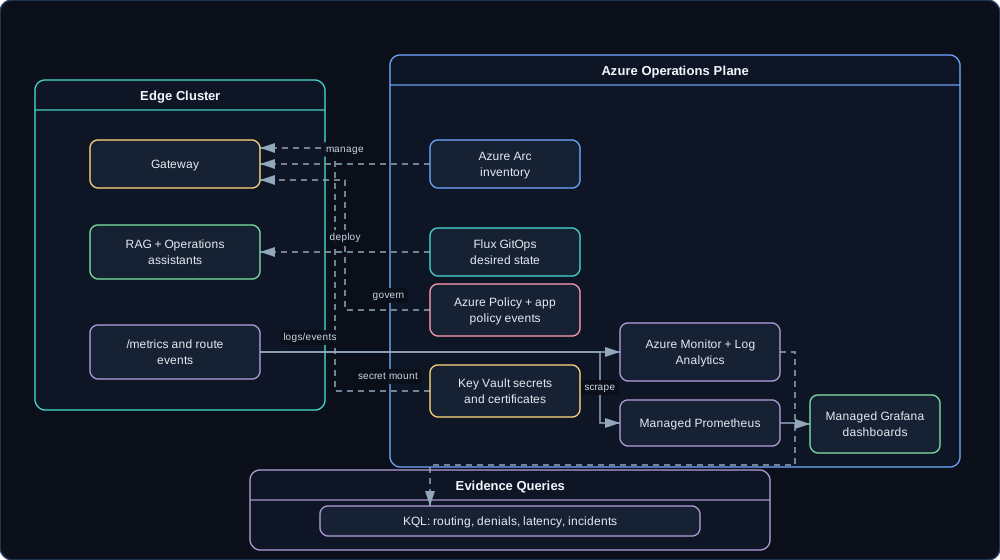
For AI on the Edge, every local execution path needs an operations path:
The dashboards should make the architecture measurable:
Requests by backend.
Fallback count.
Denied count.
P50/P95/P99 latency.
Prompt body logging posture.
Local-only request count.
Backend health.
Camera events by site and type.
Active incidents and summaries.
If a number is not on a dashboard, it does not exist during an outage.
Evidence in Three Places
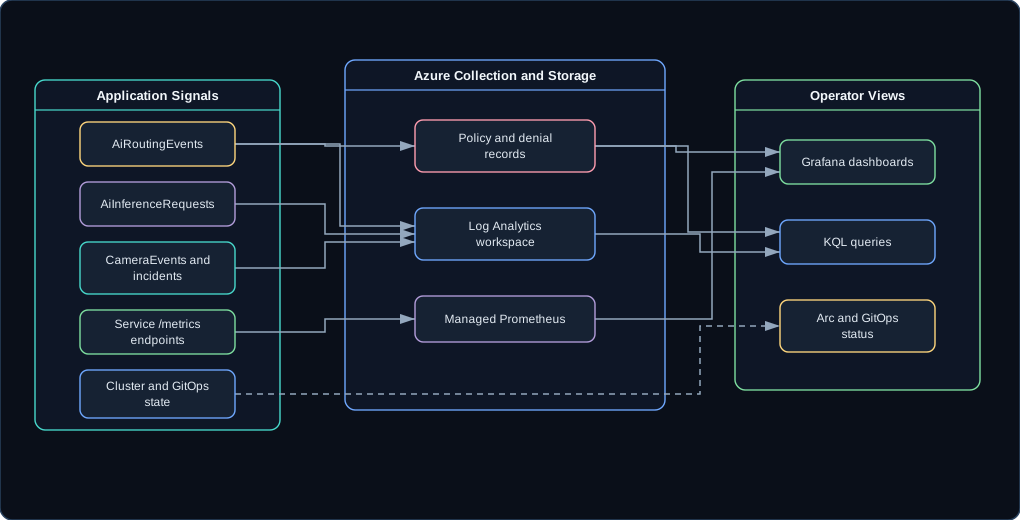
Policy evidence has to land in three places at once: the app response, the dashboards, and the query history. Any one of them alone is a story; together they are proof.
So this segment starts from the outside and works in. The app is running at the edge, the cluster shows up Arc-connected in the portal, and GitOps reports what it last reconciled - three screens that establish the estate exists before anything interesting happens to it. Then requests go through the gateway, Grafana fills in with backend selection, latency, fallback and denial counts, and a KQL query over routing events shows the same activity from the log side.
The turn is a deliberate LocalOnly denial, and the point is watching one refusal appear in all three surfaces: the response the app got, the counter on the dashboard, and the row in Log Analytics. If a secret rotation is wired up by then, it closes the segment with a config reload or a rollout, which is the least glamorous and most reassuring thing in the talk.
One caveat before anyone pastes these into their own workspace: the queries below target the planned Log Analytics schema. AiRoutingEvents, AiInferenceRequests, and CameraEvents exist once the ingestion pipeline ships, so read them as the observability contract rather than as queries against a live workspace:
AiRoutingEvents
| summarize count() by selectedBackend, policy, decision

AiRoutingEvents
| where policy == "LocalOnly" and decision == "Denied"

AiInferenceRequests
| summarize p95Latency=percentile(latencyMs, 95) by backendId, bin(timestamp, 5m)

CameraEvents
| summarize count() by siteId, cameraId, eventType, bin(timestamp, 5m)
Signals That Already Exist
The earlier demos already emit the signals worth collecting: gateway routing decisions, RAG retrieval and privacy decisions, camera incident summaries, and backend health and failures. The private cloud buildout already frames Arc and GitOps as the management overlay for the local Kubernetes environment. Demo 4 turns those signals into operational evidence instead of log lines nobody reads.
What Had to Be Built
The new work is infrastructure and observability - none of it glamorous, all of it load-bearing:
Bicep or Terraform for the Azure resources.
Helm or Kustomize for Kubernetes deployment.
Managed Prometheus scrape config.
Grafana dashboard JSON.
KQL saved queries.
Key Vault secret integration for the Azure-governed path.
Application policy events that match dashboard and query fields.
Policy examples, split by the layer that actually enforces them. This split matters more than it looks, because people assume Azure Policy reaches inside applications, and it does not:
The three application rows land in three different components: the gateway admin surface refuses the unknown endpoint, the routing engine refuses the cloud hop, and the telemetry pipeline drops the prompt body. To say the split plainly: Azure Policy governs Azure resources such as tags and secret sources, and it cannot block a gateway from enabling an unknown model backend. The routing boundaries in this demo are application-level policy events, surfaced through the same evidence flow as the Azure-side rules.
The Brittle Demo Trap
Installing cloud operations live during a talk is how this demo breaks, and the fix is to refuse the temptation. Preflight the Azure path, keep a recording or a screenshot for the portal views, and save the live running for the local dashboard.
Arc and Azure Monitor need outbound connectivity and prior setup, so a disconnected demo shows local application behavior and local telemetry with no cloud forwarding while the link is down. Pretending Azure is live while the edge is offline buys nothing: nobody in the audience can see your resource group anyway, and everybody can see a stalled terminal.
When the Governance Demo Is Real
The governance story holds up when the Azure side is reproducible rather than hand-built: make infra-plan and make infra-apply produce the same resources twice, the gateway, assistants, and dashboard deploy through Helm or Kustomize, and the Grafana dashboards import themselves instead of being rebuilt from memory an hour before the talk. Metrics show up locally either way, and in Managed Prometheus when Azure is connected.
The claim that actually matters is the denial one. A single LocalOnly refusal has to be findable in the app logs, on the dashboard, and in a KQL query over Log Analytics, because governance you can only see from one angle is governance nobody will trust. And make teardown has to remove the demo resources afterward, since leaving resources behind is how a demo quietly becomes a bill.
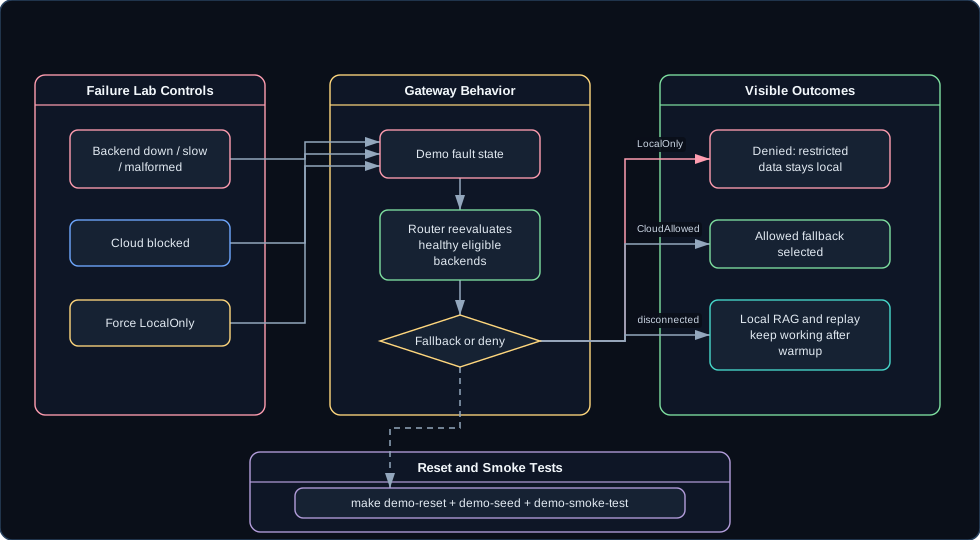
The edge has to stand alone sometimes. Internet links fail. Cloud services throttle. A local model crashes mid-request, an accelerator endpoint saturates, and sooner or later a response adapter meets a payload that is almost, but not quite, OpenAI-compatible. None of that is hypothetical; it is just a Tuesday.
Demo 5 turns all of that into a failure lab: a controlled set of ways to break the system on demand, so the architecture can be shown failing in visible, policy-correct ways. Failure behavior is part of the product here, and I would rather show it on purpose than meet it for the first time on stage.
Why Build a Failure Lab
Happy-path AI demos are easy to fake. The questions a real system has to answer are harder:
What happens when the cloud is unavailable?
What happens when the local model is unavailable?
What happens when the best backend is slow or saturated?
What happens when a backend returns malformed output?
What happens when a restricted request has no eligible backend?
Can the presenter reset the demo without debugging state live?
Every one of those has an answer in this architecture. The lab exists so the answers can be demonstrated instead of asserted.
In the design, AiOnTheEdge.DemoScenarios owns deterministic failures and reset controls behind the shared demo endpoints. Fault types are posted to the single faults endpoint, and reset is the shared endpoint every service exposes:
POST /admin/demo/faults   { "fault": "backend-down",      "backendId": "<id>" }
POST /admin/demo/faults   { "fault": "backend-slow",      "backendId": "<id>" }
POST /admin/demo/faults   { "fault": "backend-malformed", "backendId": "<id>" }
POST /admin/demo/faults   { "fault": "network-cloud-blocked" }
POST /admin/demo/faults   { "fault": "policy-local-only" }
POST /admin/demo/reset    clears active faults and restores the seeded state
The dashboard needs a Failure Lab page:
What each Failure Lab control does to the system
Control
Result
Toggle backend down
Backend health changes and route decisions adapt.
Force restricted prompt
Policy changes to LocalOnly.
Block cloud
Cloud backends become unavailable.
Return malformed response
Adapter error is recorded and fallback is evaluated safely.
Run smoke test
Pass/fail appears for all primary demo scenarios.
Reset
Stable state returns without manual cleanup.
Faults should be simple and explicit - every one maps to something boring that can actually happen:
Keeping every fault boring enough to actually happen
Fault
Implementation
Backend down
Disable backend or point to a dead URL.
Backend slow
Add delay in mock backend.
Malformed response
Return invalid OpenAI-compatible payload.
Cloud blocked
Mark cloud backends unhealthy in demo mode.
Local unavailable
Stop or disable local adapter.
Accelerator saturated
Return HTTP 429 or a configured saturation signal.
Staging a Fail-Closed Denial
A fail-closed denial is the moment worth staging. The sequence I use:
Start with all backends healthy.
Ask a normal public question and show a valid route.
Mark the prompt restricted and show LocalOnly.
Disable foundry-local, then mock-accelerator, so no device or edge backend is left.
Ask again and show the denial: cloud is healthy but ineligible, and nothing eligible is healthy.
Change policy to CloudAllowed for nonrestricted content.
Show fallback to an allowed backend.
Block cloud.
Show local RAG and camera incident summaries still work with cached models and local data.
Run make demo-smoke-test.
Reset the demo.
The edge does not have to answer every request. It has to answer the requests it is allowed to answer and refuse the rest clearly. That sentence is the whole design review, and everything else in this post is machinery for proving it.
Parts That Can Already Break
The earlier demos already provide the components that can fail: gateway route selection, RAG retrieval and generation, camera event replay, Azure-backed telemetry, and accelerator backend registration. Demo 5 turns those components into test cases instead of ad hoc failure stories.
The New Work Is the Harness
The new build is the failure harness itself:
Central fault state.
Reset and seed endpoints.
Smoke-test runner.
Failure Lab UI.
Deterministic mock backend behaviors.
Local telemetry when Azure is unavailable.
Dashboard panels for denials, fallbacks, adapter errors, and reset status.
The smoke test should validate the contract the presenter needs:
make demo-reset
make demo-seed
make demo-smoke-test
That test should cover local route, cloud-allowed fallback, local-only denial, malformed response handling, camera replay, RAG citation, and reset. When it passes, I stop worrying about whatever the venue’s Wi-Fi is doing.
Too Many Faults Ruin the Show
The failure lab can become too noisy. The audience should see two or three failures live, not every possible fault; a parade of toggles is its own kind of confusion. The best live sequence is:
Local backend down.
Restricted prompt denied.
Cloud blocked but local RAG still answers.
Everything else is useful for validation and backup, but not every control needs to be shown in a 45-minute talk.
It pays to be precise about what offline actually means here: local application behavior can continue after warmup, while live Azure management and cloud telemetry depend on connectivity and prior setup. Anything vaguer and someone walks away convinced the whole stack runs air-gapped forever.
Signing Off on the Failure Lab
The lab is finished when every fault can be turned on and cleared from both the API and the UI, and when each failure produces a reason a person can read and a reason a query can find. Those two audiences are different: the user-facing text has to say what happened, and the telemetry has to say why the router decided what it decided. The rule underneath all of them stays fixed - a restricted prompt never reaches cloud, whatever combination of faults is active.
The other half is recoverability. make demo-smoke-test covers every primary failure path, at least one complete demo path runs with the network unplugged after warmup, and reset is designed to return the system to a known state in under a minute, which is roughly the length of a question from the audience. A demo you cannot recover from between segments is a demo you only get to run once.
New hardware is fun. Rewriting a working application to accommodate it is not. That trade shows up in almost every accelerator demo I have sat through: the board goes live, and quietly the app grows a special client library, then a special request shape, then a special set of apologies for whenever the board is having a bad day. If adding an accelerator means rewriting the app, the hardware lane has become an island.
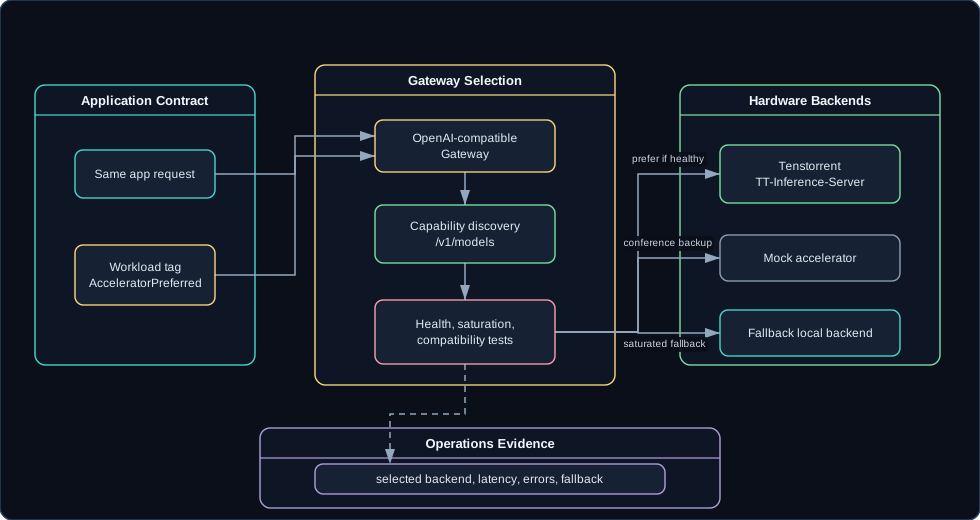
Demo 6 keeps the application completely unchanged. Tenstorrent - or a mock accelerator that behaves like one - registers as another backend behind the AI on the Edge Gateway, and the routing policy decides what that is worth.
How Hardware Becomes an Island
Accelerator demos tend to drift toward hardware-specific code paths:
A different client library.
A different request shape.
A different health check.
A different dashboard.
A different fallback story.
Each step is defensible on its own during bring-up, and together they are bad for application architecture. The application should ask for a workload. The router should decide whether an accelerator is eligible, healthy, and preferred.
Nobody here is claiming one hardware path is always faster. The claim is narrower and more useful: specialized hardware can join the governed edge platform and stay part of it.
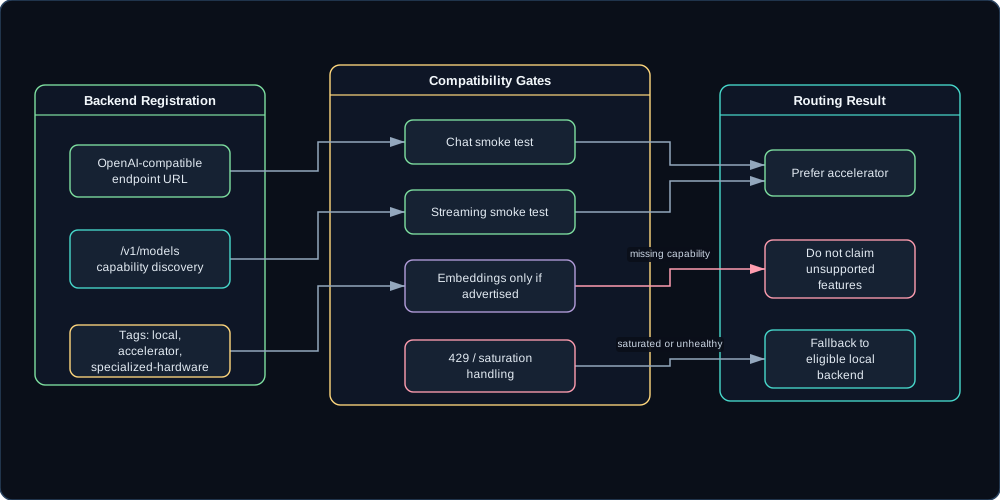
From there the gateway treats Tenstorrent like any other OpenAI-compatible backend until it has a reason not to:
Discover models through /v1/models or a configured model list.
Record capabilities explicitly.
Test chat, streaming, and embeddings independently.
Track latency, status codes, saturation, selected count, and fallback count.
Expose compatibility failures in the route trace.
The routing policy is AcceleratorPreferred, not AcceleratorOnly. If the accelerator is healthy and supports the requested model family, it wins. If it is unhealthy or saturated, the router picks another eligible local backend, and the audience never has to think about it.
One status caveat I want on the record: as of August 2026, Tenstorrent’s documentation describes TT-Inference-Server for deploying LLM serving on its hardware, including container management, model downloads, serving configuration, and an OpenAI-compatible API endpoint. Model support still depends on the validated hardware and software combination, which is exactly why the gateway discovers and displays capability rather than assuming it.
What the Demo Has to Prove
The proof the audience needs is that no application code changes. Everything else is staging:
Show the backend registry: Foundry Local, Azure Foundry, mock cloud, Tenstorrent, mock accelerator.
Ask the same operational question used in Demo 1.
Add workload metadata: AcceleratorPreferred.
Show the router selects tenstorrent-edge or mock-accelerator.
Stream the response through the same app and gateway.
Show metrics and backend health.
Mark the accelerator saturated.
Ask again.
Show fallback to another eligible local backend.
Show the app request did not change.
Step ten is the entire point. Steps two through nine exist to make step ten believable.
I also avoid benchmark claims unless the evaluation harness produced them. The architecture claim here is about portability and governance. Vague performance wins are exactly what a skeptical room smells first.
What Is Actually Left to Build
Most of this lane is assembly work. The private cloud buildout already describes the Tenstorrent lab path and the mixed accelerator environment. The Demo 1 gateway already provides the abstraction that keeps the app unchanged, and the Demo 5 design supplies saturation and fallback controls. What remains is adapter hardening:
Tenstorrent backend config profile.
Capability discovery and display.
Health check and timeout behavior.
Compatibility tests for the supported API paths.
Accelerator-preferred routing policy.
Saturation fallback behavior.
Optional hardware metrics later, starting with endpoint-level metrics now.
The mock accelerator is a requirement of the demo plan. Real hardware is valuable, and the session still has to work when the board is offline, in use by something else, or running a different model than the demo expects. A dependency I cannot reproduce on demand is a coin flip wearing a schedule.
Where Overpromising Starts
Overpromising hardware support is how this lane goes wrong. OpenAI-compatible does not mean feature-complete: chat, streaming, embeddings, tool calls, batch behavior, and error semantics all need separate smoke tests, because each one is its own little contract the hardware may or may not honor.
So the gateway displays capability and denial explicitly instead of discovering the gap mid-request:
{"backendId":"tenstorrent-edge","eligible":false,"reason":"Backend does not advertise embeddings capability."}
An honest “no” from the router beats a mystery timeout from the hardware every time.
Judging the Accelerator Lane
The lane works when a Tenstorrent endpoint or the mock accelerator registers as a backend like any other, the router prefers it for workloads tagged AcceleratorPreferred, and fallback happens on its own when the board is unhealthy or saturated. Metrics have to carry selected backend, latency, errors, and fallback count, since the only interesting question about an accelerator is how often the router actually chose it and what happened when it did not.
The criterion I watch is the one about the application: the app has to be byte-for-byte the same before and after the accelerator exists. The moment swapping a backend means touching application code again, this stopped being an architecture and became a science project. And no performance number appears anywhere unless the evaluation harness produced it, which is the same rule I would want applied to somebody else’s hardware post.
Related Posts
This post connects the Tenstorrent private cloud buildout to the AI on the Edge gateway. The hardware is part of the architecture, but not the whole architecture - that distinction is why the application survived this demo untouched.
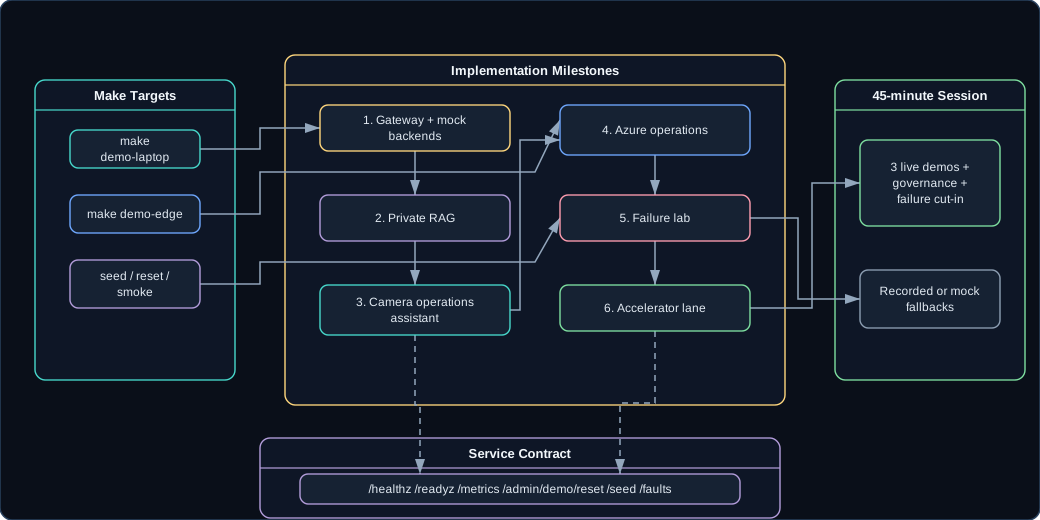
By this point in the series the demos exist as stories: routing, private RAG, camera operations, Azure governance, failure behavior, and accelerator backends. What the series still needed was the machine those stories run on. So this post is the engineering brief for building the presentation repo, written so another engineer - or an agent - can implement it without rediscovering the story first. The standard throughout is that the system should be boring to run. All of the excitement belongs on stage.
Why the Repo Has to Be Boring
A conference demo that needs thirty manual steps is a liability. Miss one step in a hotel room the night before, and talk day turns into live-debugging in front of people who came for architecture. Determinism is not a preference here; it is the design constraint. The repo needs deterministic setup, seed data, reset behavior, smoke tests, local mode, edge mode, and clear health endpoints.
The target is not “works on my machine after I remember the sequence.” The target is:
make demo-laptop
make demo-edge
make demo-seed
make demo-reset
make demo-smoke-test
make infra-plan
make infra-apply
make teardown
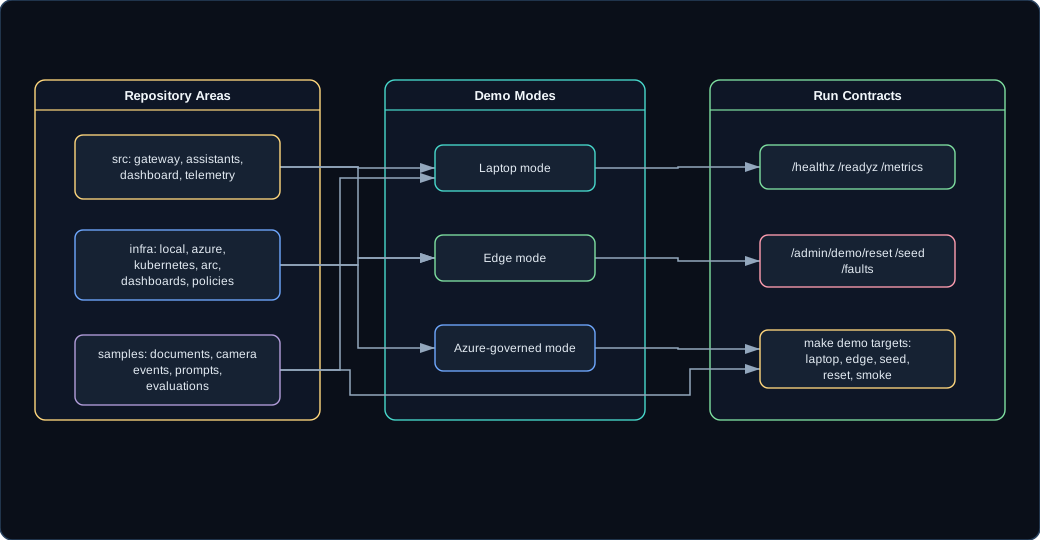
The first five targets drive the demo itself; the last three manage the Azure-governed mode’s resources. If those commands exist and mean something, the architecture can survive rehearsals, travel, hotel Wi-Fi, and last-minute hardware failures. I have watched enough talks die in the third minute to want the repo doing the remembering instead of me.
An honest caveat about that tree: it and the contracts below describe my private reference implementation. The repo is not public, so treat the layout as the specification an implementation should satisfy rather than a checkout you can clone.
Every service exposes the same operational endpoints as a floor:
Individual services add to that list rather than replacing it. The Knowledge Assistant carries /admin/reindex on top of the six; the Operations Assistant carries its replay controls. The six above are what a health check, a reset script, or a smoke test can assume without knowing which service it is talking to.
And every AI request emits the same route decision event shape (field values below are illustrative, not measurements):
{"timestamp":"2026-06-30T12:00:00Z","scenario":"private-rag","classification":"restricted","requestedModel":"local-chat","selectedBackend":"foundry-local","decision":"Allowed","policy":"LocalOnly","fallbackUsed":false,"promptBodyLogged":false,"latencyMs":842,"promptTokens":640,"completionTokens":122,"reason":"Restricted content must stay on edge."}
requestedModel records the concrete model the router resolved the requested family to, which is why it reads local-chat rather than chat. That single event is the contract between the gateway, dashboard, metrics, logs, KQL queries, and the talk narrative. When something looks wrong on stage, this is the artifact that explains why.
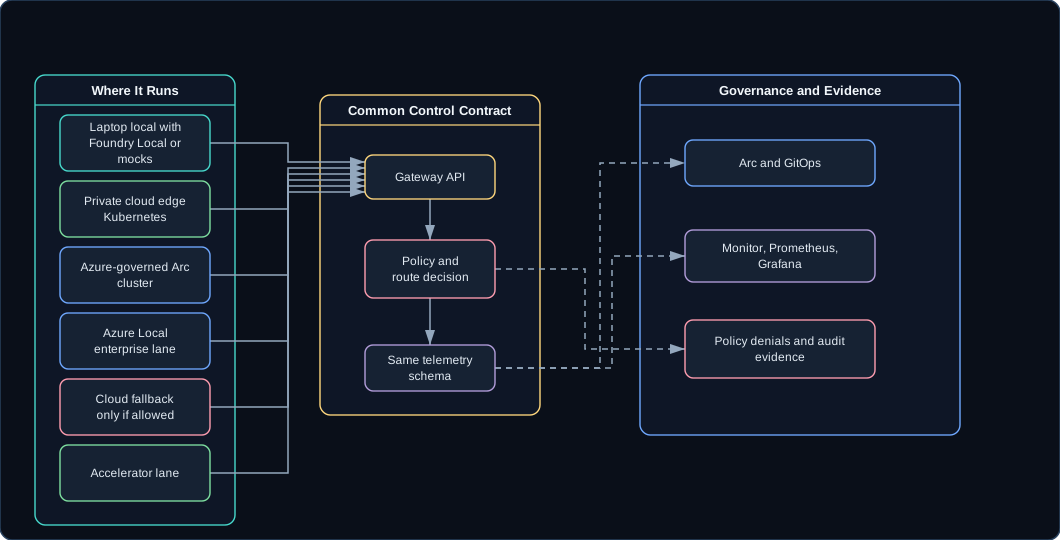
The implementation supports three modes. Laptop mode is the reliable conference fallback: .NET app, local or mock model runtime, local vector store, simulated camera events. Edge mode runs Kubernetes or k3s with the gateway, assistants, dashboard, MQTT, simulator, and observability. Azure-governed mode layers Arc, Azure Monitor, Managed Prometheus, Grafana, Key Vault, GitOps, optional Azure IoT Operations, and optional Azure Local on top.
Laptop mode is the default live path. Edge mode proves the system is deployable. Azure-governed mode proves the operating model.
Build in Demo Order
Milestones go in the order they appear on stage, so every stretch of build time produces something demonstrable:
Build order, matched to the order demos go on stage
Unlocks
Build
1. Gateway demo
Gateway, mock backends, policies, dashboard, route events, make demo-laptop.
Disable backend, deny cloud fallback, show telemetry.
43:00-45:00
Close
Cloud-governed, locally executed.
Optional cut-ins are Foundry Local on Azure Local, Tenstorrent hardware, AIO data flow to Event Hubs, and disconnected mode. They should be additive, not dependencies; the talk has to work with every one of them missing, which is also why nothing cloud-side gets installed live during the session.
What This Post Locks In
The blog series now defines the acceptance criteria and audience moments, the private cloud post defines the physical environment, and the camera posts define the IoT workload; an implementation should treat all of that as requirement inputs. This post adds the implementation contract:
The repo layout.
The make targets.
The common service endpoints.
The route decision event.
The build order.
The presentation flow.
The standard for deterministic demo behavior.
None of that is glamorous. It is the part that decides whether the demos behave the same way twice.
The Pile of Disconnected Samples
There is a specific way this repo could fail while every individual piece works: seven services’ worth of clever code that together demonstrate nothing. Every service should contribute to the same route decision, metrics, dashboard, and reset story.
If a feature does not help the session or make the system more repeatable, it can wait. It will still be there after the talk.
Ready to Rehearse
The system is ready when the make targets mean what they say. make demo-laptop brings up the primary path with no cloud involved, make demo-edge deploys the same thing onto local Kubernetes, and make demo-seed, make demo-reset, and make demo-smoke-test respectively create the documents, camera events, backend config and policies, put all of it back to a known state, and prove that routing, RAG, incidents, faults, and accelerator fallback still behave. On the Azure side, make infra-plan and make infra-apply provision the governed mode repeatably and make teardown takes it back down without leaving anything billable behind.
Two smaller checks matter more than they look. Every service answers on health, readiness, metrics, seed, reset, and faults, so nothing in the demo needs a service-specific runbook. And the dashboard shows the current state before I say a word, which is how I find out whether the system is ready without narrating a diagnostic to the room. When all of that passes, the night before the talk is for sleeping, not for shell scripts.
Everything in this series reduces to one principle I kept coming back to: local execution still needs a control plane.
Models can run on a laptop, an edge server, Azure Local, a cloud endpoint, or specialized local hardware. That flexibility is only useful when applications can use it without hardcoding placement decisions and when operators can see, secure, and govern what happened. This post is the reference architecture for the project - the stable one to bookmark or cite while the individual demo posts keep moving around it.
Why Local AI Needs a Control Plane
Enterprises want local AI for good reasons:
Keep private data near where it is generated.
Reduce latency.
Continue operating during network disruption.
Control inference costs.
Use local accelerators and edge hardware.
Avoid sending every operational event to a cloud model.
I share every one of those motivations; they are why this project exists at all. The risk is unmanaged local AI: invisible endpoints, inconsistent model APIs, unclear fallback, missing telemetry, ad hoc secrets, and no proof that restricted data stayed local.
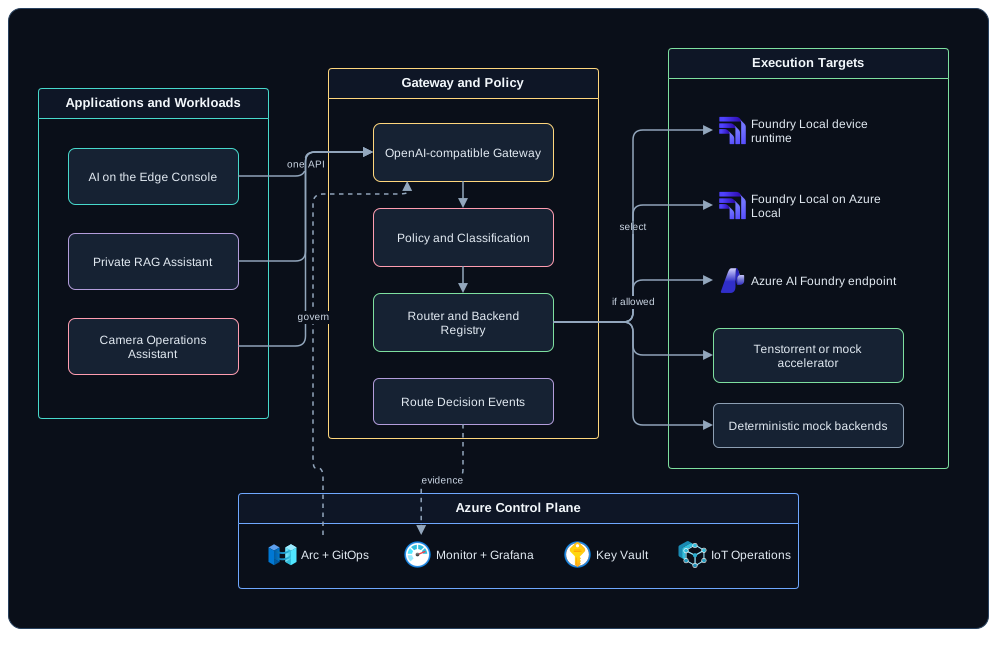
The architecture solves that by separating application intent from model placement.
The gateway classifies the request or accepts classification metadata.
The router filters backends by policy, then by which ones serve the requested model family.
The router selects a backend or denies the request.
The gateway calls the selected backend through an adapter.
The gateway streams or returns the response.
Telemetry records the route decision and privacy posture.
Dashboards and KQL queries make the behavior visible.
Step three is where applications stop caring about model names. A request asks for a family - chat or embeddings - and each backend’s registry entry lists the families it serves alongside the model name it uses for them, so the router does the translation and the application never learns that local-chat and cloud-chat are the same request in different places.
Eight steps, one place to look whenever anyone asks what happened to a request.
Conference-safe local path with Foundry Local or mocks.
Private cloud edge
Kubernetes or k3s deployment in the local lab.
Azure-governed edge
Arc-connected cluster with GitOps, Monitor, Prometheus, Grafana, Key Vault, and policy.
Azure Local
Enterprise edge inference path with Foundry Local on Azure Local where preview access and environment readiness exist.
Cloud fallback
Azure AI Foundry model endpoint for workloads that are allowed to leave the edge.
Accelerator lane
Tenstorrent or mock accelerator backend exposed through the gateway.
The lanes are not interchangeable, and choosing between them is mostly a trade between evidence and independence. Laptop local is the one lane that never needs anything outside the machine, which is why it is the conference path, and the price is that none of the Azure-side evidence exists there - what you can prove is limited to what the local dashboard shows. Private cloud edge, described in the Tenstorrent buildout, buys the real deployment shape: multiple nodes, real networking, real failure modes, and telemetry that still stops at the cluster boundary.
Azure-governed edge is where the operating model becomes visible to people who are not in the room, and it is also the lane with a hard dependency: Arc and Azure Monitor need outbound connectivity and prior setup, so local application behavior survives a link failure while live management and cloud telemetry do not. Azure Local is the enterprise version of that same lane, gated on preview access rather than on effort. Cloud fallback is the only lane that is a policy decision before it is a deployment decision - a workload reaches it because its classification allowed it to, never because it was the healthiest option available. And the accelerator lane trades a capability question for a performance one: the gateway has to discover what the hardware actually serves before it can prefer it, which is why every accelerator claim in this series is hedged and every accelerator demo has a mock behind it.
Foundry Local is the on-device application runtime. Foundry Local on Azure Local is the enterprise edge inference lane and, as of September 2026, is treated as preview/request-access - re-check the linked overview before repeating that status, since it is exactly the kind of claim that ages fast. Tenstorrent is an accelerator backend, not a separate application architecture. Azure IoT Operations supplies the edge data-plane option for the camera workload.
Six Policies That Do the Governing
The policy vocabulary is intentionally small - six values carrying the whole boundary story. LocalOnly and PreferLocal decide how hard the router tries to stay on the edge, CloudAllowed opens the cloud lane, AcceleratorPreferred biases toward specialized hardware when it is healthy and capable, FallbackDisabled stops the router from trying a second backend after the first one fails, and NoPromptLogging keeps bodies out of telemetry. The row-by-row behavior of each one is tabulated in One App, Many Places to Run AI, and I would rather point at that table than print a second version of it that can drift.
This is not enough for every production system, and I would not pretend otherwise. It is enough to demonstrate the most important boundary: restricted data does not leave the edge just because the cloud is available.
The Camera Fleet Workload
The camera fleet is the reference workload because it has real edge characteristics (and because anyone who has read this blog knows I have a soft spot for cameras that outlive their vendors). The three-part Azure IoT Operations series owns the details - the camera control plane, the MQTT broker and camera fleet, and data flows with the ONVIF connector - and what makes that workload useful here is the shape of it:
Distributed sites.
Outbound-only device connectivity.
MQTT topic contracts.
Operational events and incidents.
Local runbooks and private configuration.
Azure IoT Operations as an optional broker and data-flow layer.
The operations assistant consumes the existing cameras/# stream, normalizes events, builds incidents, retrieves runbook snippets, and asks the gateway for a local summary. The camera control plane remains the owner of camera identity, commands, network model, and topic contract.
Operating It Like Real Infrastructure
The operations model has to prove that edge AI can be run like real infrastructure:
Git is the source of desired state.
Arc brings edge Kubernetes into Azure management.
Metrics show backend selection, latency, fallback, and denials.
Logs show route decisions and incident summaries.
Key Vault stores secrets in the governed path.
Policy events explain why requests were allowed or denied.
Reset and smoke tests keep demos repeatable, because local execution is not an excuse for local-only operations.
The Case Where It Refuses
Every claim above collapses into one scenario. A Restricted RAG request arrives under LocalOnly, every device and edge backend is down, and a cloud backend is sitting there healthy. The gateway denies the request and the dashboard and logs carry the reason.
That is the architecture doing its job: it refused to answer, because answering would have violated policy. I would much rather stage that refusal during a demo than meet it for the first time in an audit.
The Target an Implementation Has to Meet
The build guide specifies the implementation, and the status framing there applies to how much of it exists today. What that implementation is aiming at comes down to three things. Placement has to be invisible to application code, so moving a workload from a laptop runtime to an edge cluster to an accelerator changes configuration and nothing else. Every routing decision has to be explainable after the fact, with restricted requests structurally unable to reach a cloud backend and both assistants citing the local material their answers came from - source documents for RAG, structured events and runbooks for camera incidents.
The third is operational. Azure has to be able to observe routing, failures, policy denials, and backend health from outside the cluster, the same system has to come up in laptop-only mode and on an edge cluster without divergent code paths, and seed, reset, and smoke tests have to behave the same way every time. Accelerator hardware stays optional throughout, with a mock backend standing in for it, because an architecture that only works when a specific board is awake is a much smaller claim than the one this series is making.
 (opens in a new tab)
 (opens in a new tab)