One application asks one question and gets one useful answer. Where the model actually ran - the laptop, an edge cluster, a cloud endpoint, a Tenstorrent-backed server, or a mock backend - is none of the application’s business. Keeping that placement choice invisible to the app is the entire job of the AI on the Edge Gateway, and this first demo exists to make that abstraction obvious end to end.
Why Hardcoded Endpoints Stop Scaling
Hardcoding model endpoints is fine for a prototype and bad for a platform. Once an application knows too much about the model runtime, every placement decision turns into an app change:
- Moving from a laptop runtime to an edge server changes code.
- Adding a cloud fallback changes code.
- Testing a specialized accelerator changes code.
- Denying cloud fallback for restricted data becomes app-specific retry logic.
The app should express what it needs. The platform should decide where that request is allowed to run.
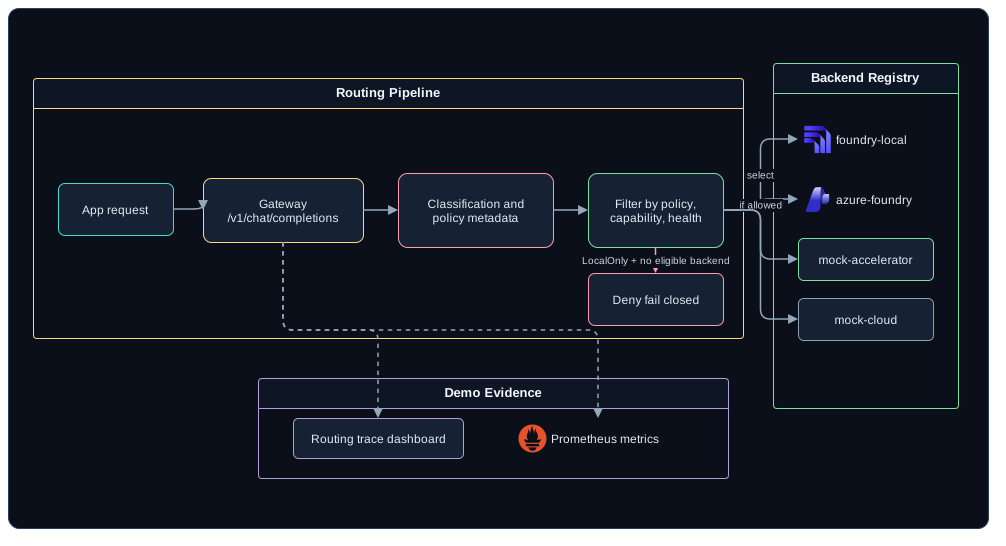
What the Gateway Looks Like
 (opens in a new tab)
On the outside, the API surface is deliberately boring - it is the surface applications already speak:
POST /v1/chat/completions
POST /v1/embeddings
GET  /v1/models
GET  /healthz
GET  /readyz
GET  /metrics
POST /admin/route/explain
POST /admin/backends/{backendId}/enable
POST /admin/backends/{backendId}/disable
POST /admin/demo/faults
Routing those endpoints is a backend registry. Two entries carry the argument:
{
  "Backends": [
    {
      "id": "foundry-local",
      "kind": "FoundryLocal",
      "baseUrl": "http://localhost:5273/v1",
      "families": ["chat", "embeddings"],
      "models": ["local-chat", "local-embed"],
      "location": "device",
      "capabilities": ["chat", "embeddings", "streaming"],
      "tags": ["local", "offline", "private"],
      "priority": 10
    },
    {
      "id": "mock-accelerator",
      "kind": "OpenAICompatible",
      "baseUrl": "http://localhost:5199/v1",
      "families": ["chat"],
      "models": ["accelerator-chat"],
      "location": "edge",
      "capabilities": ["chat", "streaming"],
      "tags": ["local", "accelerator", "specialized-hardware"],
      "priority": 20
    }
  ]
}
The two cloud entries follow the same shape and are omitted for length. azure-foundry is an Azure AI Foundry endpoint at priority 50 with an apiKeySecretName instead of an open port; mock-cloud is a deterministic stand-in on http://localhost:5188/v1 at priority 40. Both are tagged "location": "cloud", both advertise the chat family, and both serve a model called cloud-chat.
Two fields there keep applications out of the model-naming business. families is what an application asks for - chat or embeddings - and models is what this particular backend calls the thing that serves that family. The app requests a family, the router picks an eligible backend, and the router maps the family onto that backend’s model name. Nobody writing an app needs to know that local-chat and cloud-chat are the same request with different hosting.
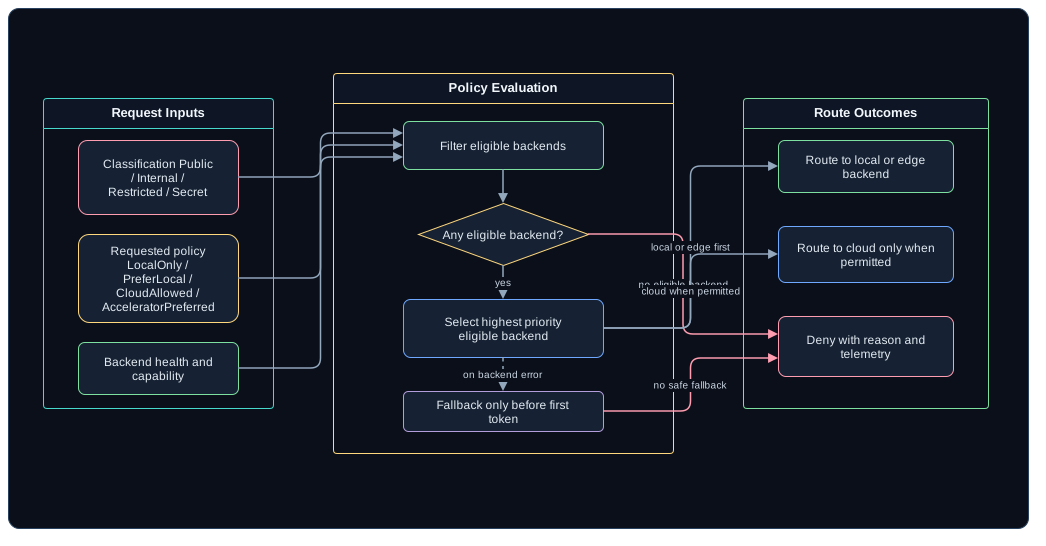
priority breaks ties among the backends that survive policy, capability, and health filtering, and lower wins. foundry-local at 10 is tried before mock-accelerator at 20, which is tried before the cloud entries at 40 and 50.
One caveat on that baseUrl: 5273 is the port Microsoft’s examples show, but the Foundry Local service port is assigned dynamically, so anything real discovers it through foundry service status or the SDK manager rather than pinning it in a registry file.
Every backend gets normalized into the same internal shape: health, advertised families and their model names, capabilities, location, tags, priority, observed latency, and current fault state. From there on, the router does not care whether a backend is a laptop runtime or a rack in the basement.
Then comes the rule I kept coming back to: the router evaluates policy before it evaluates convenience.
 (opens in a new tab)
The policies are small enough to keep in your head:
| Policy | Behavior |
|---|---|
LocalOnly |
Only device or edge backends are eligible. Cloud fallback is denied. |
PreferLocal |
Prefer local, then Azure Local or edge, then cloud if allowed. |
CloudAllowed |
Any healthy backend is eligible. |
AcceleratorPreferred |
Prefer a backend tagged accelerator when the model family is supported. |
FallbackDisabled |
Fail closed if the selected backend is unavailable. |
NoPromptLogging |
Emit metadata only and suppress prompt and response bodies. |
Foundry Local belongs in this first demo as the device-local runtime. Microsoft positions it as an on-device AI runtime and SDK, with an optional local server aimed at development and integration scenarios - which is a different job from being the shared multi-user server inference layer for the whole edge estate. For server-style edge inference, the demo keeps Azure Local, other OpenAI-compatible services, and accelerator endpoints behind the same registry.
Walking Through the Demo
Route explanation carries this demo. This is the sequence I rehearse until it gets boring:
- Open the Control Dashboard.
- Ask:
Summarize the current edge site health and recommend the next action. - Show the response streaming through the gateway.
- Open the route trace and show
selectedBackend: foundry-local. - Disable
foundry-local. - Ask again with
CloudAllowedand show the fallback toazure-foundryormock-cloud. - Disable
mock-acceleratortoo, so nothing local or edge-located is left eligible. - Ask again with
LocalOnly. - Show the denial and its reason, where a quiet cloud trip would otherwise have happened.
- Re-enable both local backends and show the metrics panel.
The line I want the audience walking out with is simple: same app, same API, different placement decision.
Borrowing the Lab Instead of Rebuilding It
The private cloud lab already supplies the edge environment and the Tenstorrent hardware lane, and the camera series already supplies an operational workload. Neither one needs rebuilding just to prove a gateway. Demo 1 can run entirely with a local runtime and deterministic mock backends.
The new implementation is the gateway foundation:
- OpenAI-compatible request and response normalization.
- Backend registry and health checks.
- Route explanation endpoint.
- Policy evaluation before fallback.
- Prometheus metrics.
- Route decision events.
- Admin controls for enable, disable, and fault injection.
- A dashboard panel for backend health, latency, selected backend, and denial reasons.
Before any of this depends on real cloud or real hardware, the implementation should include a mock local backend, the mock-cloud backend from the registry above, and a mock accelerator. Deterministic mocks are what make a conference demo survive a conference network.
When the Local Box Dies
The first failure worth showing is local backend loss:
| Situation | Correct behavior |
|---|---|
Local backend down, policy CloudAllowed |
Route to an allowed cloud or mock-cloud backend. |
Local backend down, LocalOnly, no other eligible edge backend |
Deny with a clear reason. |
| Accelerator saturated, local backend healthy | Route to another eligible edge backend. |
| Backend returns malformed OpenAI-compatible payload | Record adapter error and fallback only before streaming begins. |
And the rule underneath every row of that table: the gateway must never treat “cloud is healthy” as permission to send restricted content there.
Calling Demo 1 Done
Demo 1 earns its number when one application can call /v1/chat/completions and reach device, edge, and cloud backends through the same request shape, and the Control Dashboard can say which backend answered, under which policy, with which fallback reason and latency. Disabling a backend has to change the routing decision live, and LocalOnly has to stop cloud fallback rather than merely delay it. The metrics carry request count, latency, selected backend, fallback count, and denied count, because the dashboard is a summary and the metrics are the evidence behind it.
The criterion I care most about is the dullest one. make demo-laptop brings the whole thing up with no cloud dependency at all, which is the difference between a demo and a hope. As the opening post said, this is a private build in progress, so that target is the bar the work is aimed at rather than something you can run today.
Related Posts
This post is the platform foundation for the private RAG demo, the camera operations assistant, the failure lab, and the accelerator lane that follow. The existing Tenstorrent buildout is the hardware background; the existing camera control-plane post is the workload background. Neither is required reading, but both are why this post stayed short.